
Platform Landing Zone: Part 2 - Building the Foundation for Enterprise Azure
 Stephen Tulp
December 16, 2025
7 minutes to read
In Part 1 we deployed the foundational Platform Landing Zone architecture using Azure Verified Modules, GitHub Copilot, and Bicep. Today we will introduce CI/CD using GitHub Actions to automate the deployment process, ensuring that our Platform Landing Zone is consistently and reliably deployed across our Azure environment.
Overview
In Day 9 we explored how to automate Bicep deployments using GitHub Actions. Building on that foundation, we will now implement a comprehensive CI/CD pipeline tailored for our Platform Landing Zone deployment.
A refresher of the end-to-end process for deploying Bicep infrastructure code using GitHub Actions is shown below.
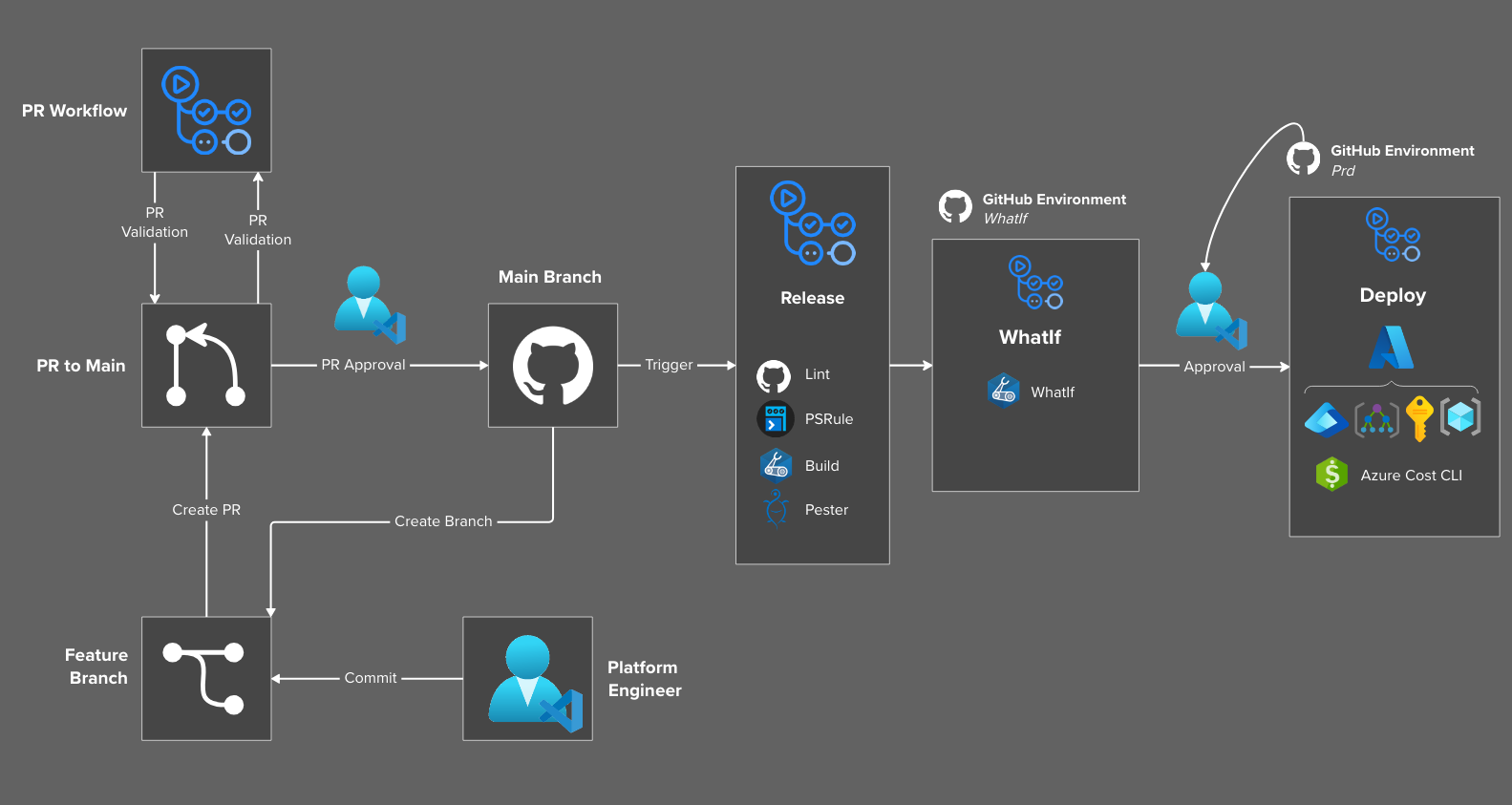
The table below outlines the GitHub Action Release workflows that we will leverage to deploy the Platform Landing Zone architecture, including supporting reusable workflows.
| Repo | Pipeline | Description |
|---|---|---|
| adventCalendar-2025 | Pull Request | Pull Request validation into Main |
| adventCalendar-2025 | Release - Platform | Deployment of the Platform Services resources |
| adventCalendar-2025 | Release - Platform (Canary) | Canary deployment of Platform Services resources |
| adventCalendar-2025 | Release - Platform Connectivity | Deployment of the Platform Connectivity Landing Zone resources |
| adventCalendar-2025 | Release - Platform Management | Deployment of the Platform Management Landing Zone resources |
| adventCalendar-2025 | Repository Management | Repository management activities (GH Labels, Publish Wiki, Releases, Stale PRs ) |
| adventCalendar-2025 | PR - Labeler | Apply GitHub labels to GitHub Issues and Pull Requests |
There are also reusable workflows that have been created to support the Azure Landing Zone architecture.
| Repo | Reusable Workflow | Used By |
|---|---|---|
| adventCalendar-2025 | Reusable Workflow: Deploy | Release - Platform, Release - Platform (Canary), Release - Platform Connectivity, Release - Platform Management |
Setting up Identities
To enable GitHub Actions to deploy resources into Azure, we need to create a series of Application Registrations and assign them the appropriate roles at the required scopes. We will use OpenID Connect (OIDC) to allow GitHub Actions to authenticate to Azure without needing to store long-lived credentials in GitHub Secrets.
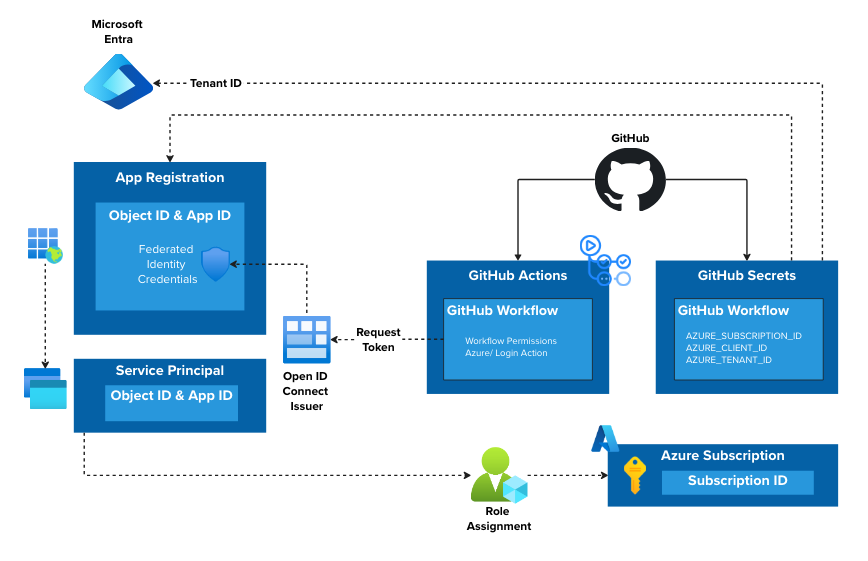
The table below outlines the application registrations that we will need, the associated permissions, and the GitHub Subject Identifiers that will be used to link the application registrations to the GitHub Environments.
| Application Registration | Applied Scope | Azure RBAC | GitHub Subject Identifier |
|---|---|---|---|
| app-registration-gh-platform-landing-zones-canary | Management Group (mg-alz) | Contributor, User Access Administrator |
platform_canary |
| app-registration-gh-platform-landing-zones-tenant | Management Group (mg-alz) | Contributor, User Access Administrator |
platform_tenant |
| app-registration-gh-platform-connectivity-landing-zones | Management Group (mg-alz) | Contributor, User Access Administrator |
platform_connectivity |
| app-registration-gh-platform-management-landing-zones | Management Group (mg-alz) | Contributor, User Access Administrator |
platform_management |
Note: As mentioned in Part 1, if you use the SubscriptionPlacement module the applied scope above needs to be at the Tenant level as that is what that module is scoped to. From a security perspective, this is not ideal as it gives the application registration highly privileged access at the tenant level, so be sure to understand the implications and is not recommended in production.
Bicep Module with Entra Extension
There is a Bicep module in the Advent Calendar 2025 Repository that uses the Bicep Microsoft Graph extension to create all the required Application Registrations and federated credentials. Use the VS Code Bicep deployment feature for this.
Lokka
Using Lokka we can quickly create the required Application Registrations and federated credentials using natural language. This will need to be done for each application registration with details updated to match your environment.
Prompt:
Hey Lokka, create an application registration for GitHub OIDC using federated credentials called
app-registration-gh-whatifusing GitHub OrganisationInsight-Services-APACand the repo asazure-landing-zones-perth-extended-zoneand GitHub Environment namewhatif. Apply the app registration to themg-alzmanagement group with the roles ofReader
GitHub Environments
To complete the OIDC puzzle and link everything together we need to create GitHub Environments that correspond to the Application Registrations created earlier. These environments will be used in the GitHub Actions workflows to specify which environment (and therefore which application registration) to use for deployments.
The following GitHub Environments will be required:
| Environment Name | Description |
|---|---|
| platform | Platform Landing Zone Deployment |
| platform_canary | Platform Landing Zone (Canary) Deployment |
| platform_connectivity | Platform Connectivity Landing Zone Deployment |
| platform_management | Platform Management Landing Zone Deployment |
There is a PowerShell script in the repo that can be used to create these environments quickly. You will need to update the script with your GitHub Organisation name and repository name before running it.
Once this is complete, you can add required approvers, timers, and other control measures for the environment. We also need to add the required secrets to each environment: AZURE_CLIENT_ID, AZURE_TENANT_ID, and AZURE_SUBSCRIPTION_ID for the corresponding Application Registration.
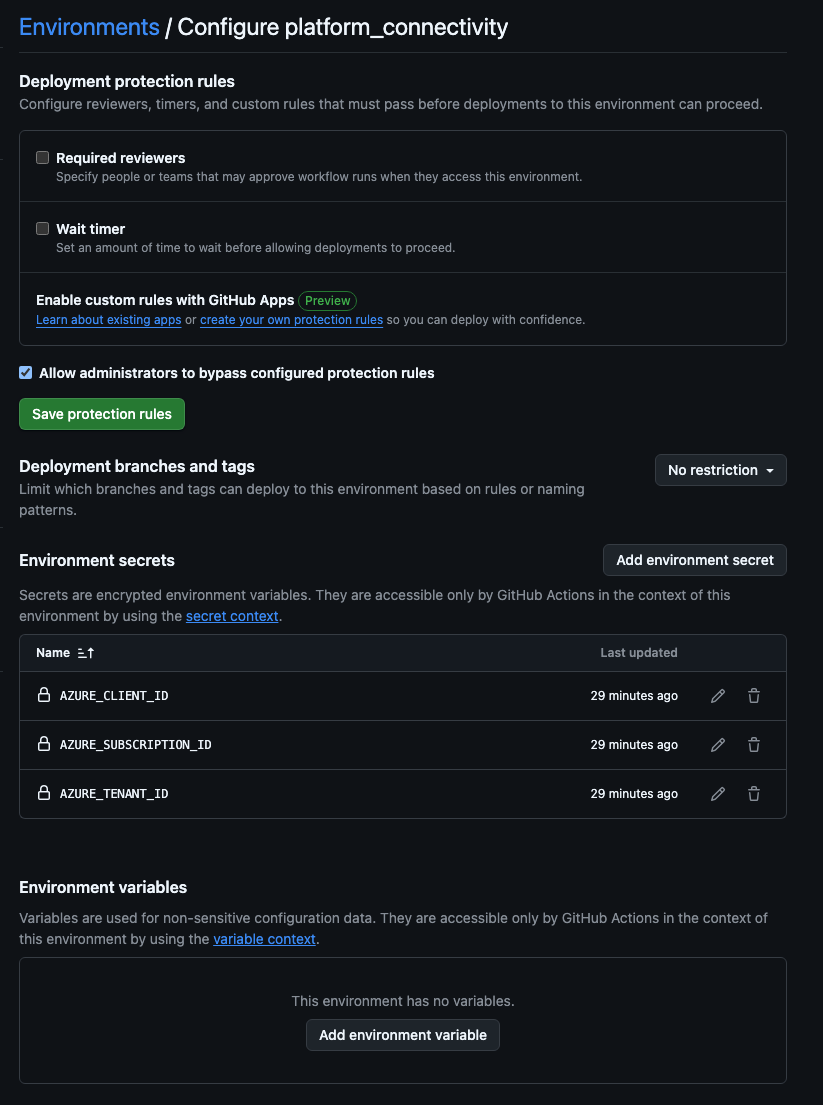
Deployment Outputs
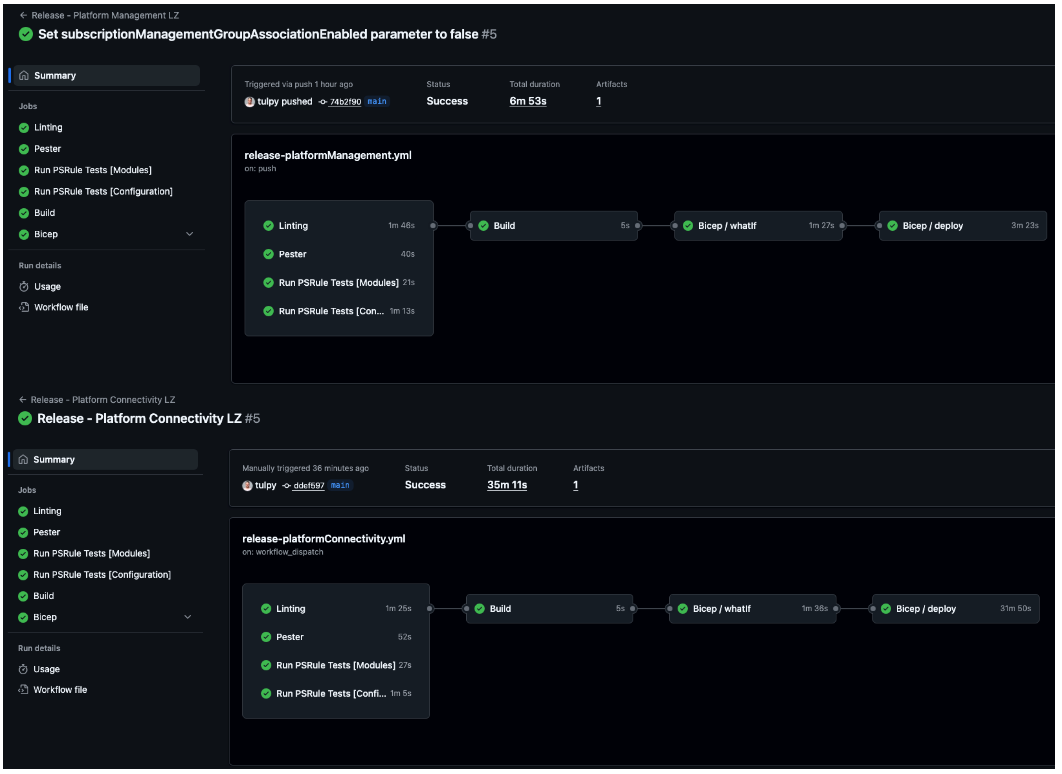
With everything in place, running the workflows should give us green across the board. Based on the configured triggers, future updates to the main branch will automatically trigger deployments to keep our Platform Landing Zone up to date.
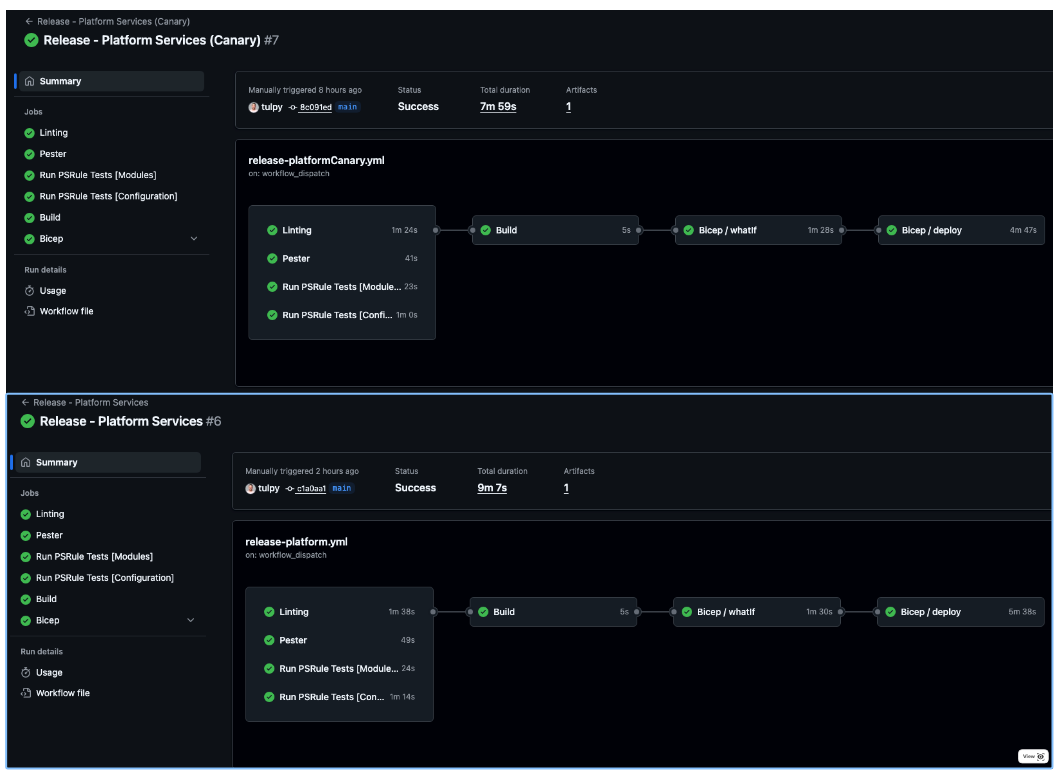
Conclusion
In this two-part series, we have explored the deployment of a Platform Landing Zone architecture in Azure using Infrastructure as Code with Bicep and Azure Verified Modules, the Bicep deploy GitHub Action for CI/CD, and testing and validation using Pester, GitHub Superlinter and PSRule. All the templates and code used in this series are available in the Advent Calendar 2025 Repository and can be used as a starting point for your own Platform Landing Zone deployments.
Edit: I mentioned in Part 1 that we were waiting on Microsoft to release the update to the Bicep Azure Landing Zone accelerator with Azure Verified Modules. That has now been released and details can be found in this LinkedIn Post