Santa's Little Helpers: Automating Bicep Deployments with GitHub Actions
 Stephen Tulp
December 11, 2025
8 minutes to read
Having clean and structured Bicep code is only half the battle when it comes to Infrastructure as Code (IaC). The other half is having a robust, automated deployment pipeline that ensures your code is tested, validated, and deployed consistently across environments. Previously I discussed the recently released azure/bicep-deploy GitHub Action. In this post, we will expand this in more detail.
The Complete Workflow
Before we get into the details of the GitHub Actions workflow, let’s take a look at the complete end-to-end process for deploying Bicep infrastructure code using GitHub Actions.
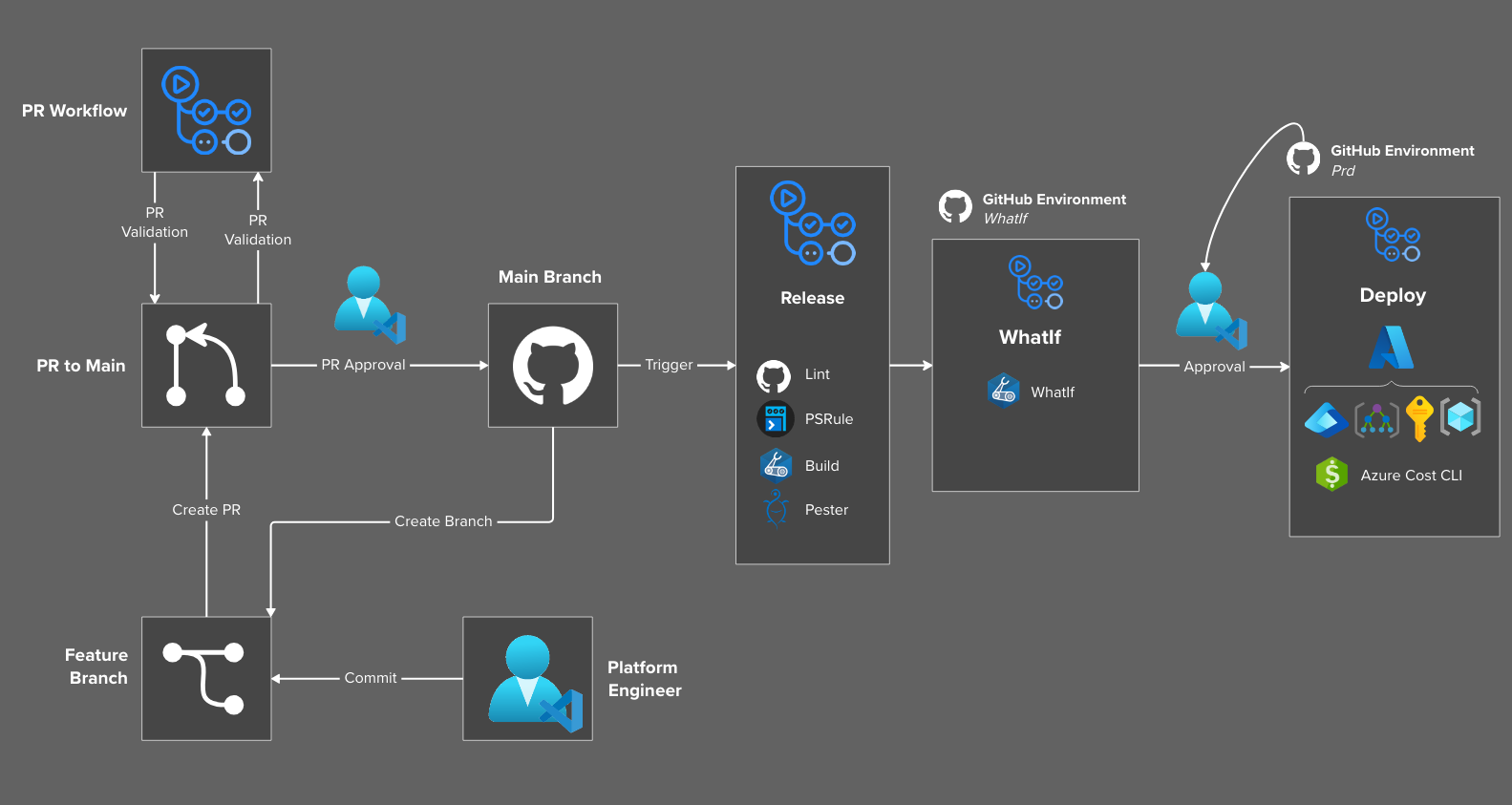
- Create a new branch from
Main. - Platform Engineer writes Bicep code and commits changes to the branch.
- Once happy with the new changes in the branch, create a pull request to merge the changes into
Main. - The PR triggers a workflow that focuses on validation, linting, PSRule, Markdown links and automated documentation.
- Once the validation is complete and the PR is approved by a CODEOWNER or equivalent, the PR gets merged into
Main. - This triggers the
Releaseworkflow that builds, tests, and deploys the Bicep code.
Note: Step 4 focuses on many similar validation and testing aspects that are also completed again in the
Releaseworkflow in Step 6. When merging the PR intoMainwe are focused on the whole repo (We want to always be able to deploy fromMainand want to ensure no bad code gets in). When it comes to theReleaseworkflow we are focused on the specific deployment code that is being released.
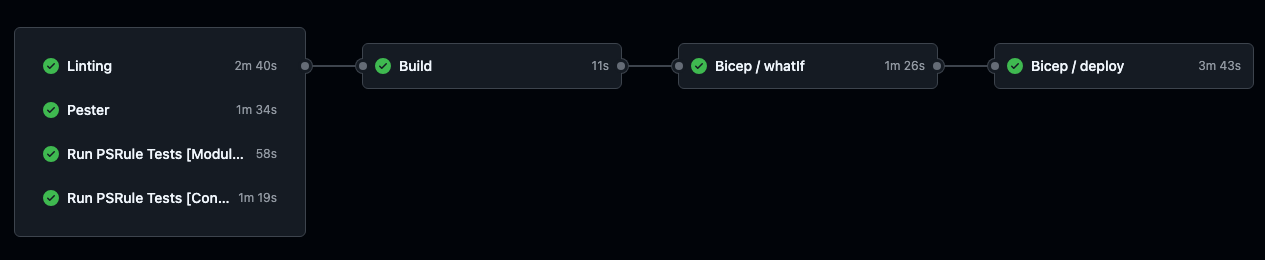
Everyone loves to see green across the board, this is what a successful Release workflow should look like.
Release Workflow
The Release Workflow is comprised of various jobs and caller workflows to complete the end-to-end process of building, testing, and deploying Bicep infrastructure code.
Linting
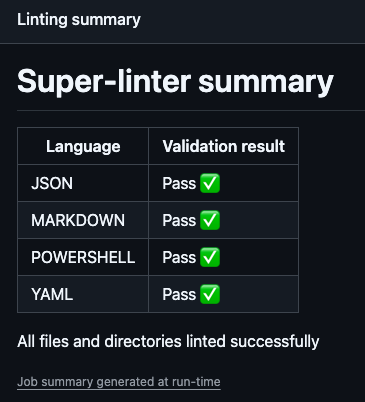
GitHub SuperLinter helps maintain code quality by automatically detecting syntax and style issues in our code. By integrating SuperLinter in the CI/CD pipeline, we can ensure that the infrastructure code adheres to best practices and coding standards before deployment.
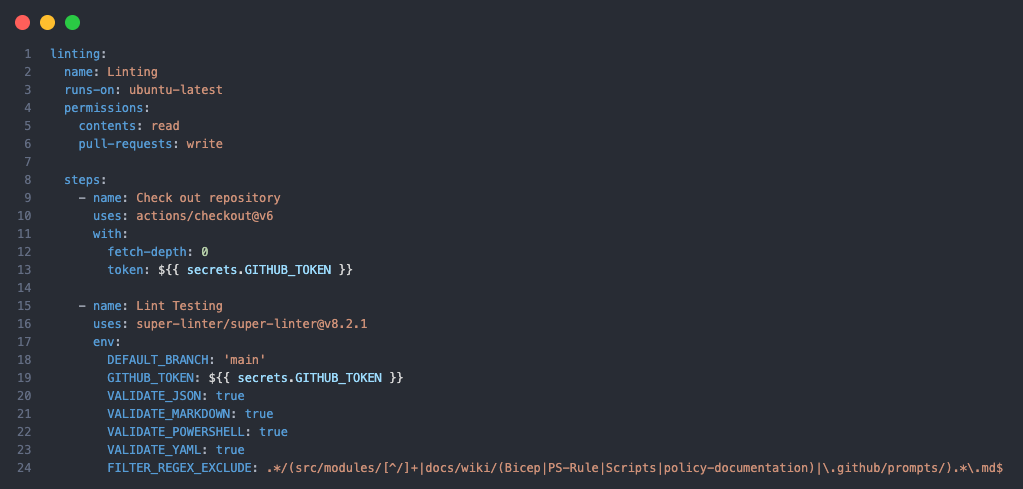
We define the languages that we need Json, Markdown, PowerShell and YAML. GitHub Super Linter doesn’t support Bicep as a language at this stage. Some folder paths and folders are excluded from the linting process as they contain auto-generated markdown or files that cause false positives. We push that to the GitHub Actions summary for a nice summarised view of the linting results.
Pester
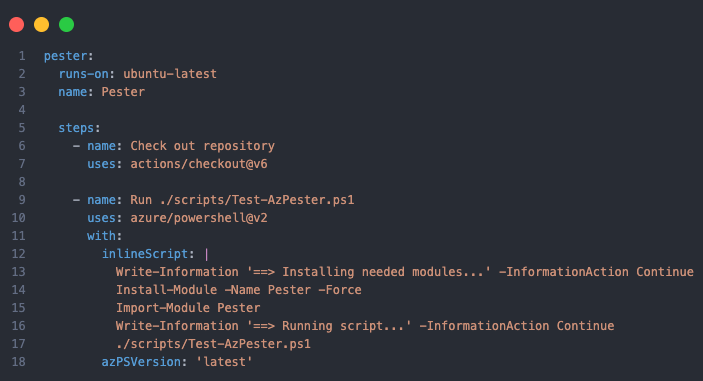
Pester is a testing framework for PowerShell that allows you to write and run unit tests for pretty much anything. By incorporating Pester tests into the CI/CD pipeline, we can validate things like Network Security Rules and pick up things that other testing might not capture.
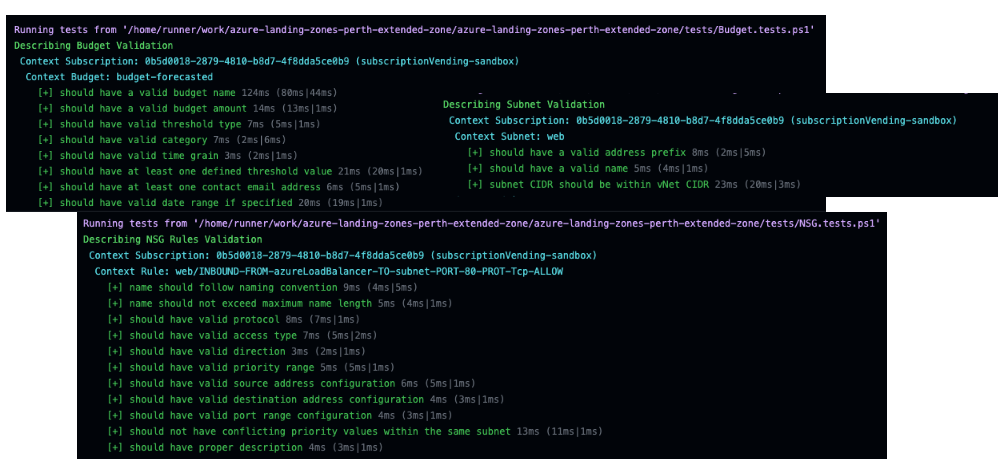
We get some nice output from the Pester tests that help visualise and summarise the results of the tests.
PSRule
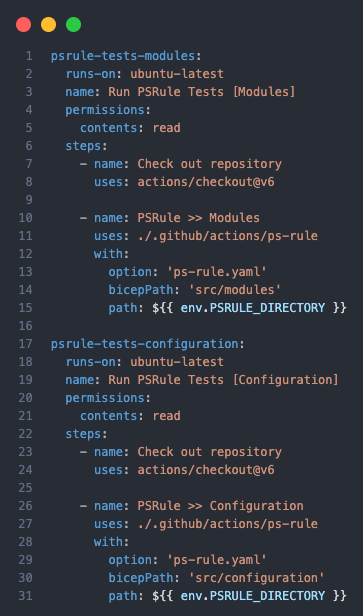
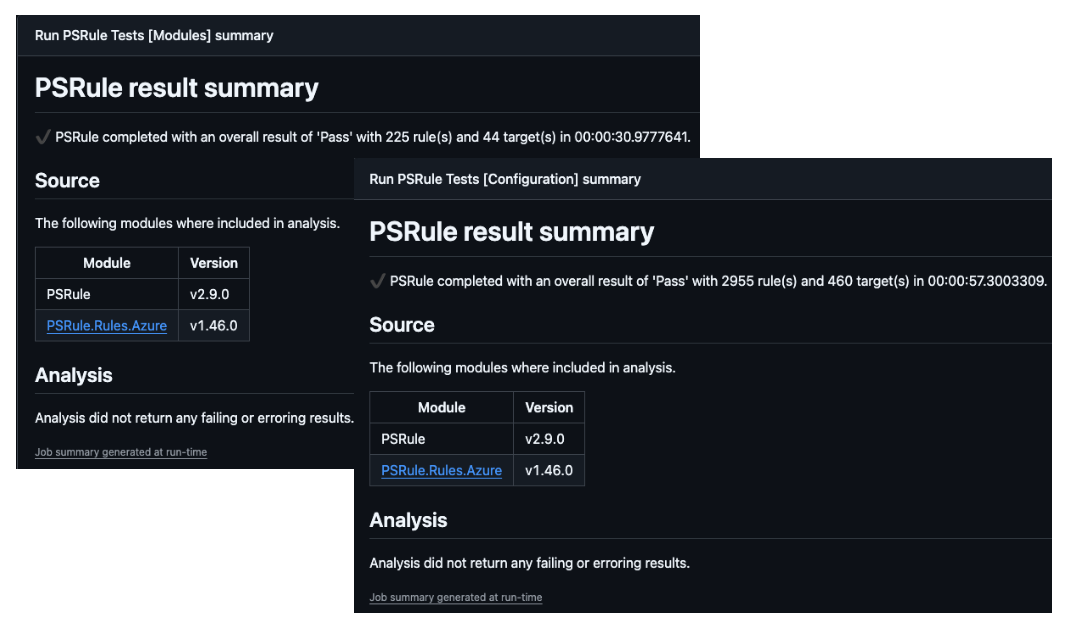
PSRule is a powerful tool for validating Infrastructure as Code (IaC) templates against the Microsoft Well-Architected Framework and compliance standards. By integrating PSRule into the CI/CD pipeline, we can ensure that our Bicep templates adhere to organisational policies and standards before deployment. By testing both the Bicep modules and the parameter files, we cover all scenarios to ensure compliance.
A summary of the PSRule results is also pushed to the GitHub Actions summary, this can be further drilled into by downloading the full report artefact that is also generated.
Build Artefact
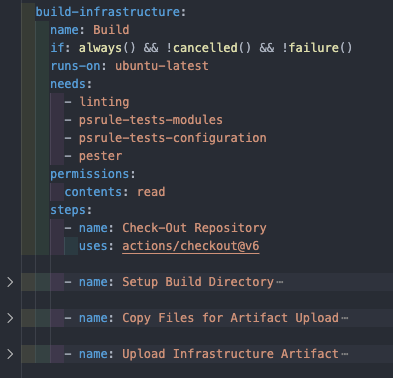
Assuming the above tests pass, we then proceed to build and publish the relevant files as an artefact for use in the deployment workflows. This includes compiling the Bicep files to ARM templates and packaging them along with the parameter files.
Caller Workflows
A Caller Workflow in GitHub Actions is a standard workflow file that uses the uses keyword within a job to execute another, separate reusable workflow. This practice promotes the DRY (Don’t Repeat Yourself) principle, allowing for common automation tasks to be centralised and reused across multiple deployments. If we want to add multiple environment deployments, we can simply call the same reusable workflow with different parameters.
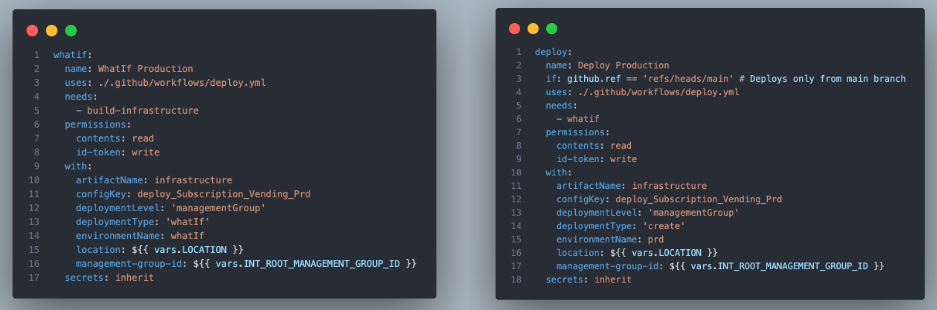
Summarising the values that are passed into the caller workflow:
- They can execute in series or parallel depending on the needs of the deployment.
- The
artefactNameis the build artefact that was published in the Release workflow. - The
configKeyinput parameter is used to determine which template and parameter files to use from the build artefact. - The
deploymentTypeinput parameter determines whether this is awhatif,validateorcreatetype deployment. - The
deploymentLevelinput parameter determines the scope of the deployment, whether that betenant,managementGroup,subscriptionorresourceGroup. - The
environmentNameis the GitHub environment that contains the Federated Identity Credentials for OIDC authentication. - The
locationof the deployment. - A
Management Group IDfor the management group level deployments. - Inherited secrets from the calling workflow.
Reusable Workflow
The Reusable Workflow is used for both the WhatIf and Deploy jobs by passing in different input parameters to trigger a full deployment instead of a what-if. This uses the GitHub Action azure/bicep-deploy@v2
- Checkout the repository
- Download the build artefact from the Release workflow
- Authenticate with Azure using OIDC
- Read and set the TemplateFile and ParameterFile based on a configuration key value in the Platform Variable yml file.
- Run the Bicep deployment action with the appropriate operation type (
what-iforcreate)- For
what-if, it uses logic to exclude certain change types and uses the new providerNoRbac flag to avoid write permissions during what-if operations. - For
create, it performs a standard deployment.
- For
This can address deployment and deploymentStacks deployment types using the same workflow by just changing the deploymentType input parameter.

Azure Cost CLI
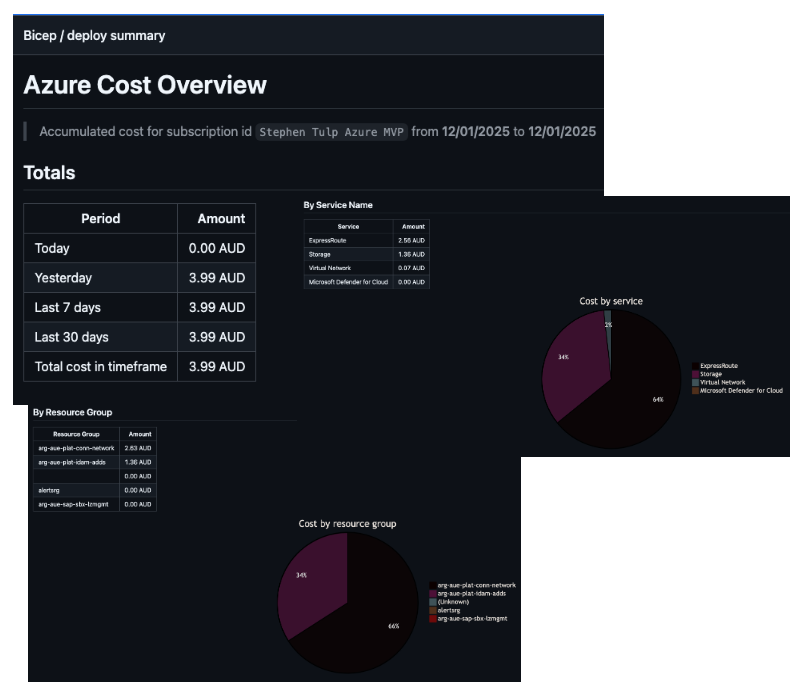
Integration of cost management into the GitHub Actions workflow to get cost estimates of your environment is a great way to bring cost awareness and visibility into your deployment process. The Azure Cost CLI is very configurable and can provide detailed cost breakdowns across a variety of dimensions and FinOps capabilities.
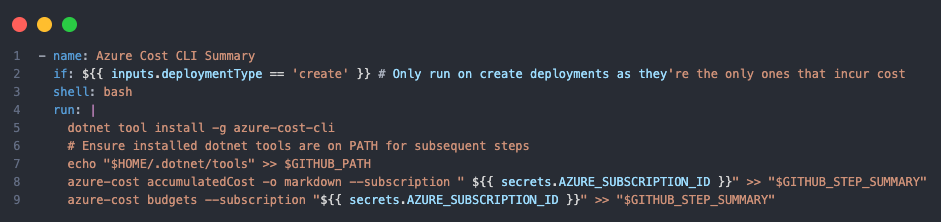
This runs on create deployments only, so it is skipped for WhatIf. The output is appended to the GitHub Actions summary for easy access.