
Platform Landing Zone: Part 1 - Building the Foundation for Enterprise Azure
 Stephen Tulp
December 15, 2025
8 minutes to read
Over the last couple of weeks we have covered updates and new capabilities across the Bicep ecosystem, GitHub Copilot, MCP and the various coding extensions, among other things. All of these tools and technologies are essential components in the toolbox of a modern Platform Engineer. However, to truly harness their power, we need some practical examples and what better way to do that than building out the Azure Landing Zone architecture using the tools and techniques we have covered so far.
TLDR All the examples can be found in the Advent Calendar 2025 Repository
Azure Landing Zone Terminology
The diagram below illustrates some of the key terminology used when discussing Azure Landing Zones.
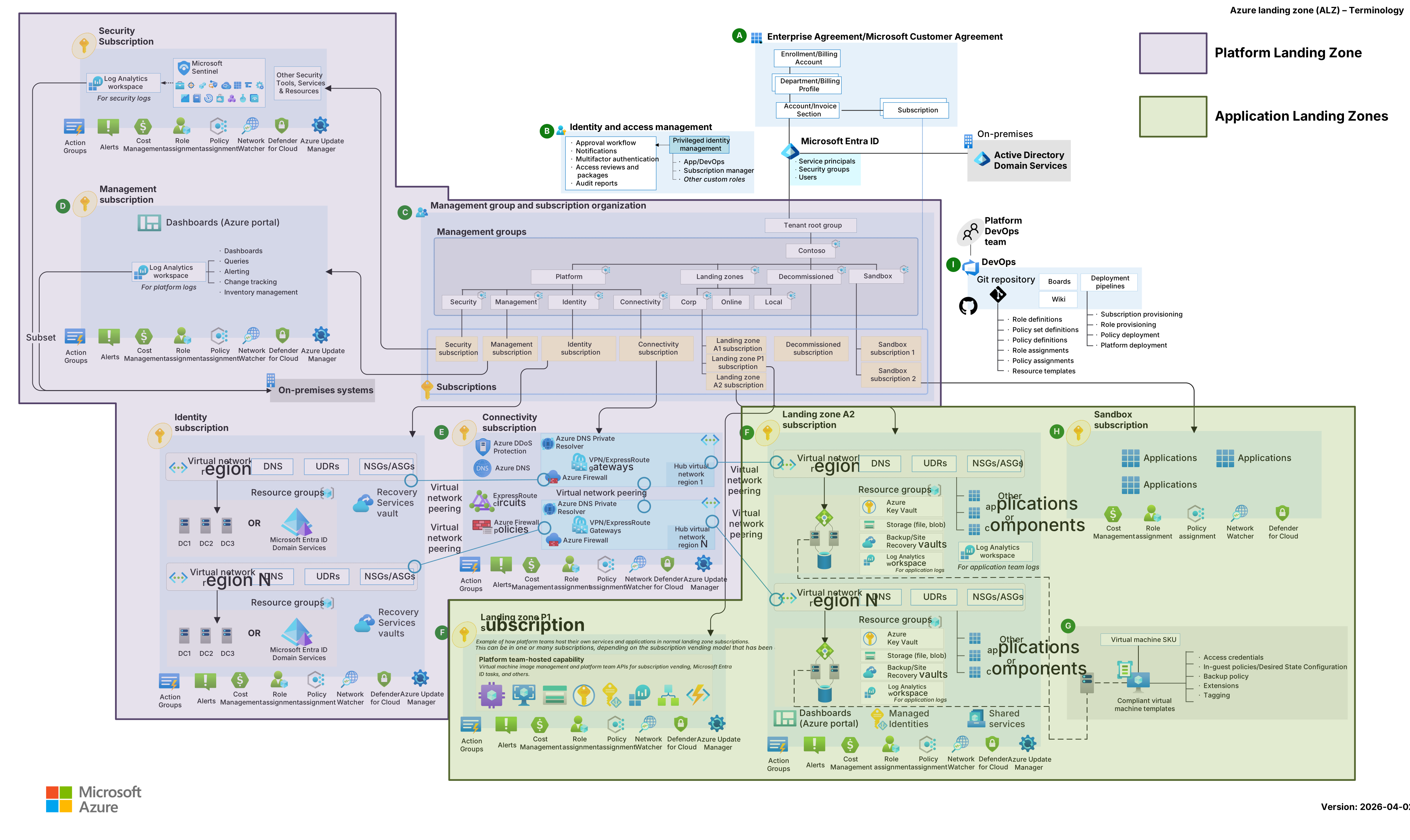

- A single platform landing zone comprising the Management Group structure and key landing zones required to support the whole landscape including
Management,Connectivity,Identity, andSecurity. - One or many application landing zones tailored to specific workloads, generally 1 significant workload and environment per landing zone.
Deployment Overview
Throughout this series, we will take all the learning from the previous weeks and combine them to build out a Platform Landing Zone using Azure Verified Modules, Bicep and the Bicep Deploy GitHub Action, we will look at the latest release of Enterprise Policy as Code and the tight integration with Azure Landing Zones policies, and finally we will look at automating subscription vending to streamline the provisioning of new Azure subscriptions that are pre-configured with our Platform Landing Zone.
Note: All the examples and code used in this series is to highlight the art of the possible and done with a VibeCoding approach, using all the AI powered tools available to speed up development and deployment. There is now a proper AVM release of the Azure Landing Zone architecture, as outlined in this earlier blog post and this LinkedIn post.
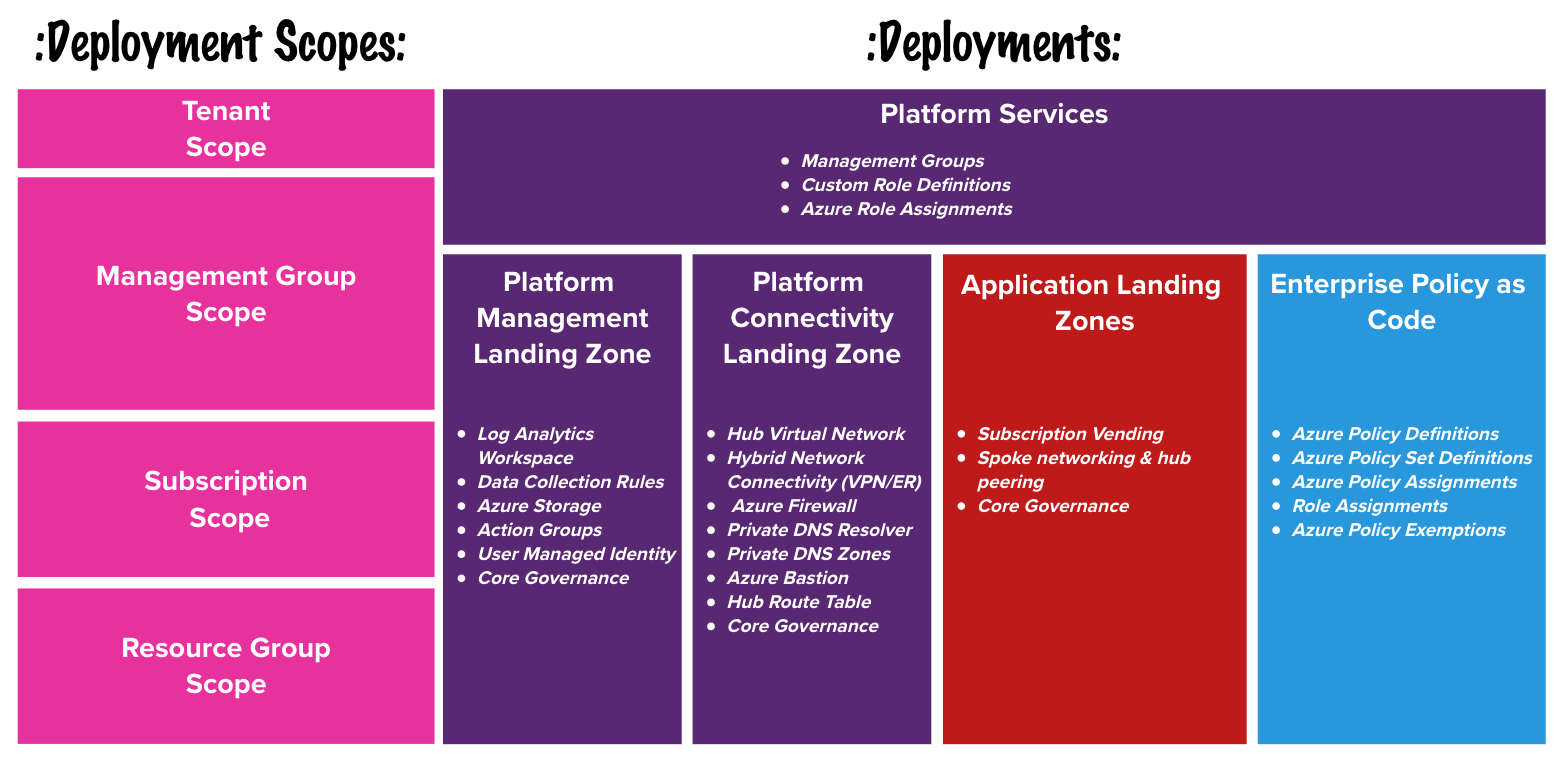
We will deploy the complete Platform Landing Zone architecture across three main deployments: Platform Services, Platform Management & Platform Connectivity using the Bicep deployment pane within VS Code.
Platform Services
We will use the 'br/public:avm/ptn/alz/empty:0.3.5' pattern module from the Azure Verified Modules Registry as the base for our Platform Landing Zone.
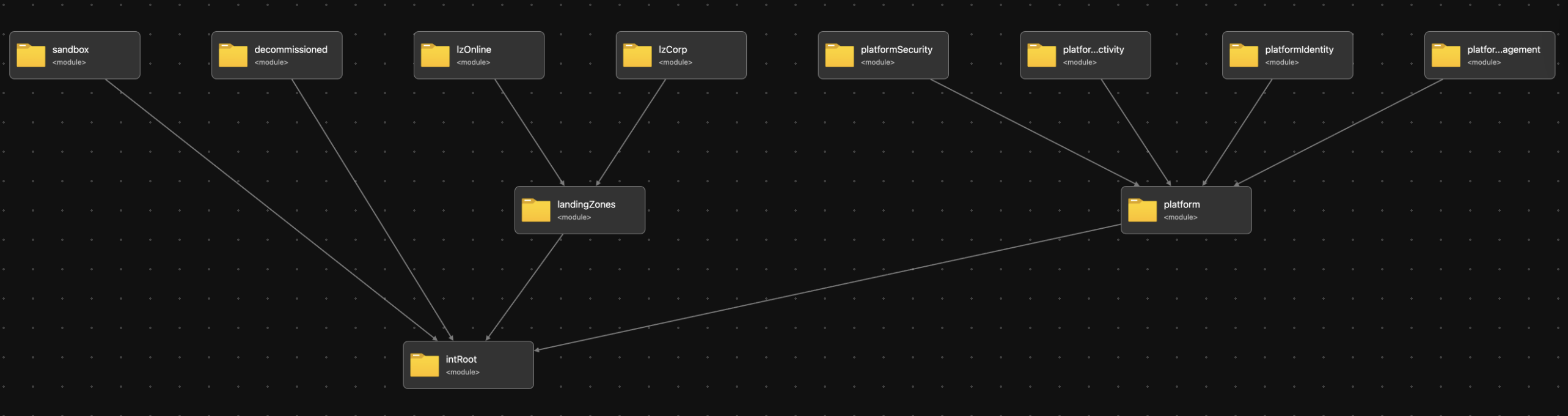
This module provides the following platform services and resources:
- Management Groups
- Role Definitions
- Role Assignments
- Policy Definitions
- Policy Initiatives
- Policy Assignments
We are going to use EPAC for Azure Policy so we will add our policy definitions, initiatives and assignments using EPAC later in the week. The EPAC deployment will have two EPAC environments epac-canary and epac-tenant to give us an environment to validate and test new and updated policies before promoting them to the tenant wide environment. To achieve this we will create a mirror structure of management groups to the ALZ management group structure as seen below.
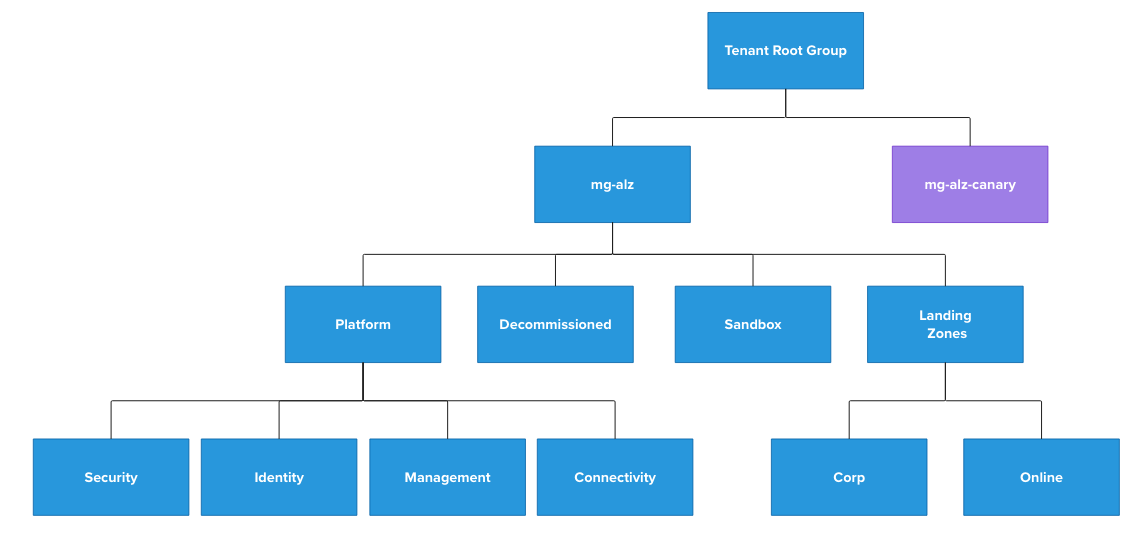
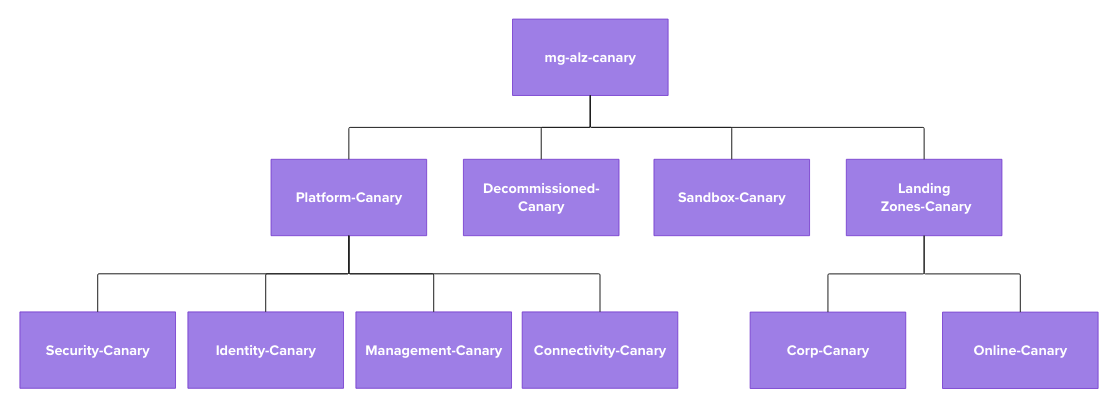
Note: We call the environment
canaryas a nod to the canary deployments used in software development and release management. Usingdevelopment,test,stagingetc can be confusing with workloads rather than the platform itself.
The Bicep parameter files define the recommended ALZ Management Group and are the same outside the naming to depict Canary and some custom Role Definitions and Role Assignments that we want to apply. These Role Definitions and Assignments aren’t required for Canary as it will only be used for testing and validation of new policies before promoting to Tenant and won’t host any workloads.
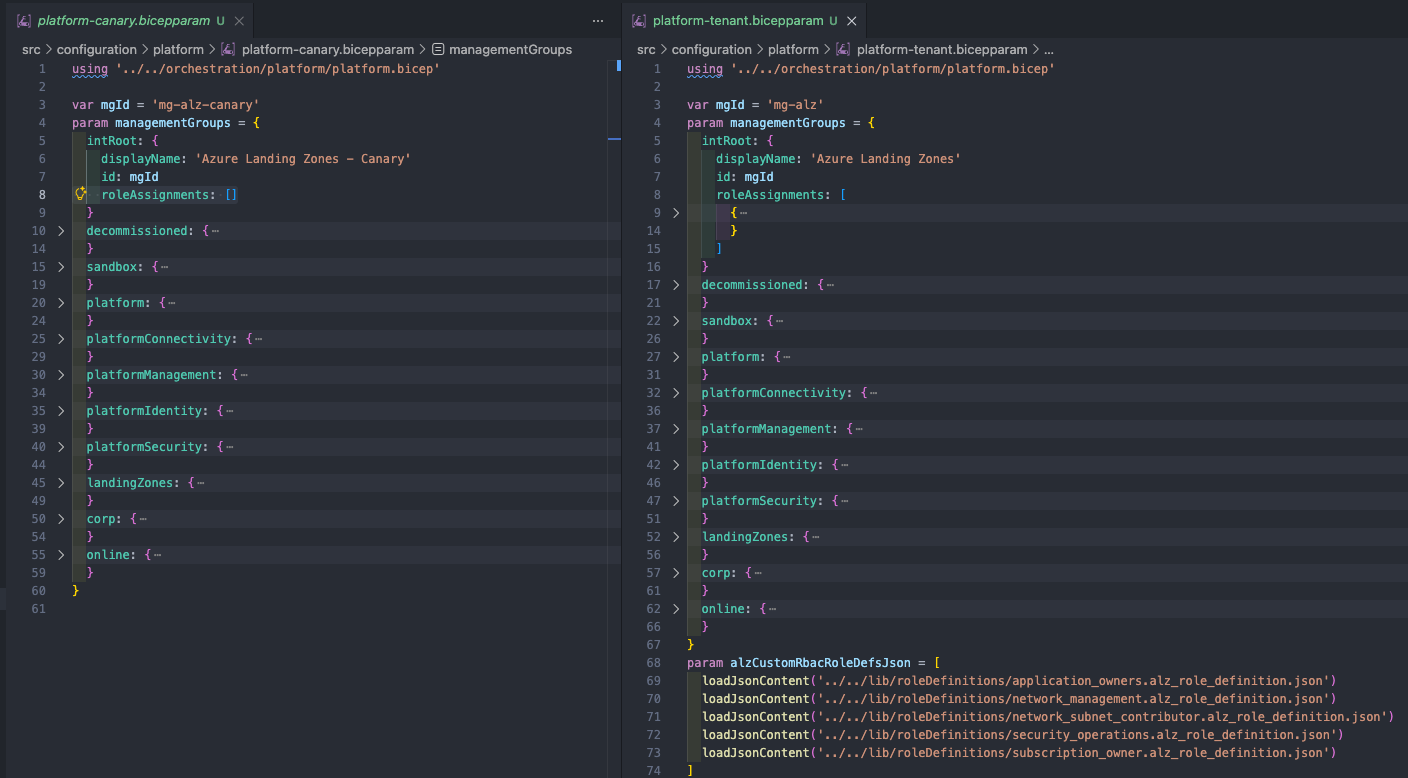
Platform Management Landing Zone
The Platform Management Landing Zone will host the core platform services required to manage and monitor the Azure environment. This includes services such as Azure Monitor, Log Analytics Workspace, Data Collection Rules, Action Groups and any cloud native management tools required for day 2 operations.
Note: I have created the Platform Management and Platform Connectivity deployments to use the SubscriptionPlacement module to move the subscription into the correct management group as part of the deployment. If you don’t really care about this then deploying at the Subscription scope, instead of the Management Group scope, will work just fine and will only need minor changes to the Bicep files.
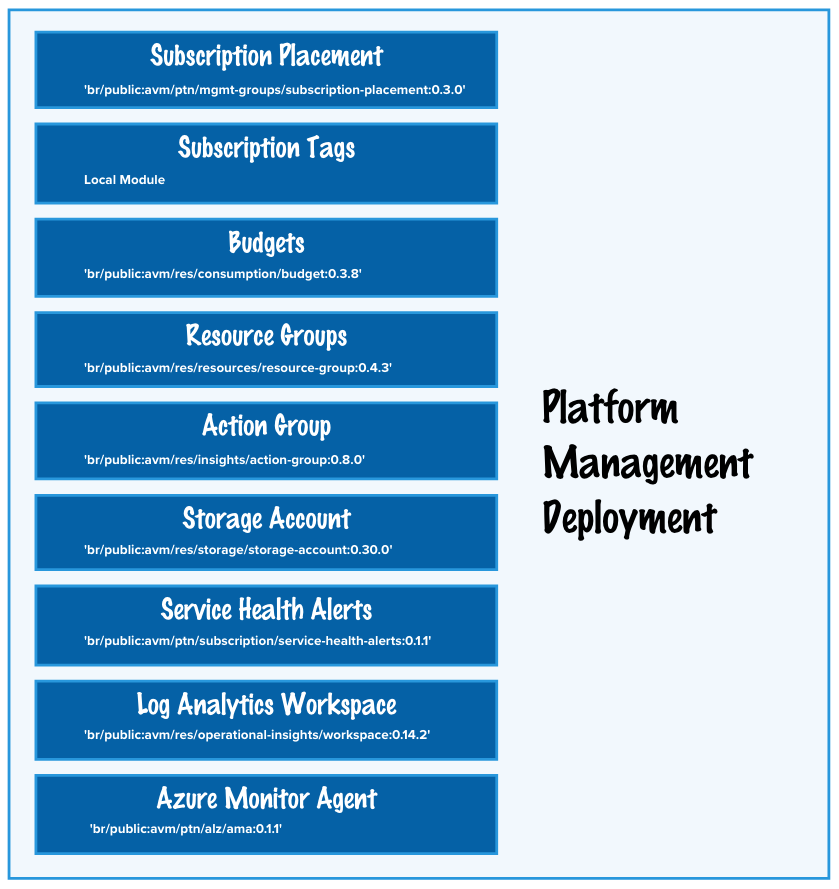
The deployment is broken into child modules leveraging Azure Verified Modules where possible to simplify the deployment and make it easier to manage and maintain.
- Subscription Placement Resource Module (Can exclude if needed)
- Core Governance
- Resource Tagging Resource Module for Subscription resource tags
- Azure Budgets Resource Module for Subscription Budgets
- Resource Groups Resource Module for core resource groups
- Service Health Alerts Resource Module for Subscription alerts
- Platform Management Services
- Log Analytics Workspace Resource Module for Platform Logs (Short Term Retention)
- Azure Monitor Agent Pattern Module (Data Collection Rules and User Management Identity)
- Action Groups Resource Module for Platform wide Action Group
- Storage Account Resource Module for Platform logs (Long Term Retention)
We have everything that we need to facilitate the resource Ids needed for EPAC policy logging and monitoring.
Platform Connectivity Landing Zone
The Platform Connectivity Landing Zone will host the core networking services required to provide connectivity both within Azure and to on-premises environments. This includes services such as Virtual Networks, Subnets, Network Security Groups, VPN Gateways, ExpressRoute Gateways and any cloud native connectivity tools required for secure and reliable network communication.

The deployment is broken into child modules leveraging Azure Verified Modules where possible to simplify the deployment and make it easier to manage and maintain.
- Subscription Placement Resource Module (Can exclude if needed)
- Core Governance
- Resource Tagging Resource Module for Subscription resource tags
- Azure Budgets Resource Module for Subscription Budgets
- Resource Groups Resource Module for core resource groups
- Service Health Alerts Resource Module for Subscription alerts
- Platform Networking Services
- Hub Networking Local Module for
- Hub Virtual Network and subnets
- Virtual Network Gateway for VPN and ExpressRoute Connectivity
- Azure Bastion for secure remote access
- Azure Firewall for centralized network security
- Hub Route Table for traffic management and routing
- Private DNS Zones Pattern Module for Azure Private DNS Zones for Private Link and Private Endpoints
- Private DNS Resolver Local Module for
- Private DNS Resolver for hybrid DNS resolution
- Private DNS Forwarding Rulesets
- Hub Networking Local Module for
Summary
In Part 1 of the series we have used the Bicep deployment feature in VS Code to deploy the foundational Platform Landing Zone architecture using Azure Verified Modules. We have covered the Platform Services, Platform Management and Platform Connectivity landing zones, setting the stage for a secure, scalable, and compliant Azure environment. Tomorrow we enable CI/CD using GitHub Actions to automate the deployment process.
All code and resources used in this series can be found in the Advent Calendar 2025 Repository and will be expanded upon throughout this series.