
Unwrapping Bicep's Christmas Surprises: Experimental Features Coming in 2026
 Stephen Tulp
December 8, 2025
8 minutes to read
As posted last week, 2025 introduced some great new Azure Bicep capabilities, including improved support for Entra ID resources. Looking ahead, 2026 looks like it’ll bring some interesting experimental features that have been around for a while in preview but are now gearing up for wider adoption. Let’s unwrap some of these exciting features that Bicep enthusiasts can look forward to in the coming year.
Note: Experimental features are not yet production-ready and may change before their final release. Use them with caution and not in production environments.
Experimental Features
Bicep supports an optional bicepconfig.json file that lets you customise your development experience. Place it in your project directory or a parent directory—Bicep uses the nearest one it finds. The experimentalFeaturesEnabled section allows you to enable features still in development, letting you test new capabilities before they’re stable.
See this link for a detailed overview on Configuring your Bicep environment
  "experimentalFeaturesEnabled": {
    "deployCommands": false,
    "testFramework": true,
    "assertions": true,
    "extendableParamFiles": true,
    "localDeploy": true
  }
An overview of all the experimental features is available in the Bicep documentation, but let’s dive into a few that caught my eye. The code and examples below can be found in my Advent Calendar 2025 repo.
Bicep Local Deploy
The Terraform vs Bicep debate will always rage on, but one feature that Terraform has is the ability to deploy to multiple technology stacks, not just Azure. Bicep has previously been Azure-only, though Entra ID resources have recently been added to address gaps for Entra ID provisioning. The diagram below shows the architecture of how Bicep templates are deployed today.
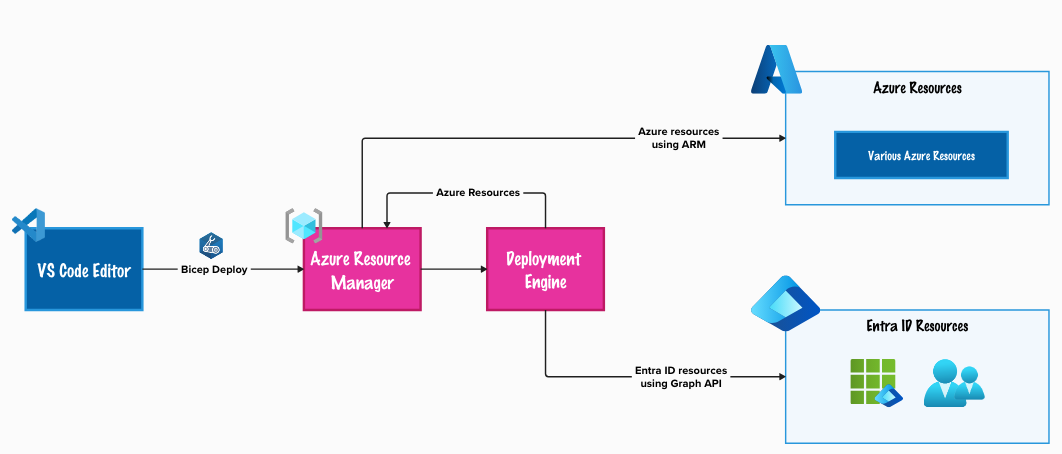
This Bicep Local Deploy feature allows Bicep to run deployments locally, so you can run Bicep extensions without a dependency on Azure. This could include creating repos and resources in GitHub/Azure DevOps, configuring Databricks or Kubernetes, or managing data plane actions in Key Vault. This new capability opens up possibilities for Bicep to manage resources beyond just Azure infrastructure.
For this example, we’ll use Bicep to deploy a GitHub repository with labels, variables, and secrets. A detailed example and guide can be found in the Bicep GitHub Extension repo created by Anthony Martin, one of the Engineering Managers for Bicep.
A summary of the Bicep template includes:
- Using the targetScope of
localto indicate that this deployment is local and not targeting Azure. - Defining parameters for the GitHub owner (user or org), repository name, description, visibility, labels, variables, and secrets.
- Using the
githubprovider to interact with the GitHub API for creating the repo, labels, secrets and variables. - Outputs of the deployment.

We define the parameters in a bicepparam file to provide values during deployment. The GitHub token is retrieved from an environment variable for security and used to authenticate with the GitHub API.
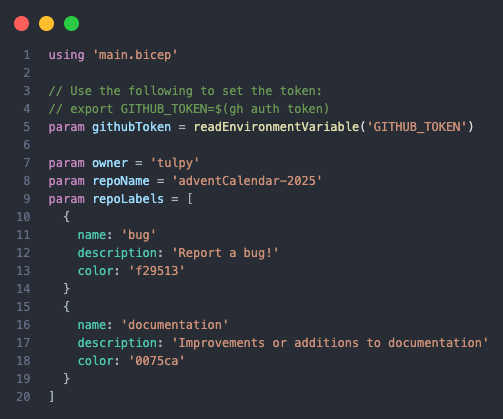
We can deploy this from VS Code using the Bicep Deployment Pane, which provides a UI panel that lets you connect to your Azure subscription and perform validate, deploy, and what-if operations, providing instant feedback without leaving the editor.

In GitHub we can see the new repo has been created (AdventCalendar-2025), with the array of GitHub Issue Labels (bug & documentation) and repo variables and secrets.
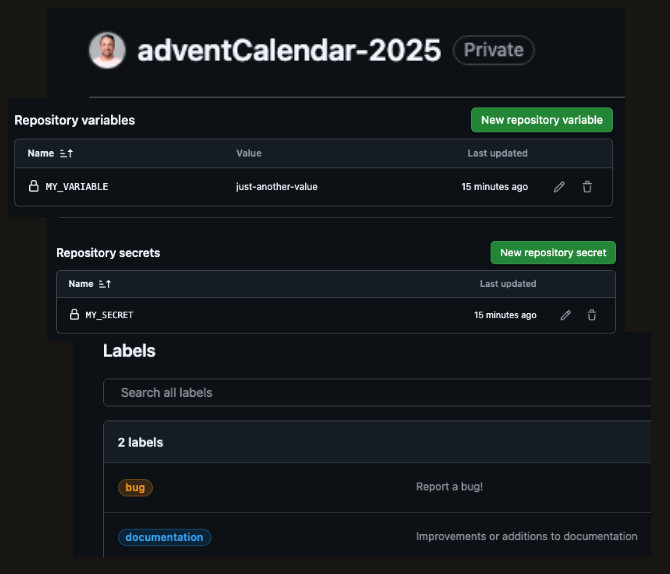
A list of extensions and examples for Local Deploy can be found in the Bicep Local Deploy Extensions registry.
Bicep Snapshot
Introduced with version v0.36.1 of the Bicep CLI, this feature allows you to create a snapshot of your Bicep files. This is particularly useful for versioning and tracking changes over time. It gives an almost state-like experience for your Bicep templates that can be done locally with no dependency on Azure.
We have a simple SpokeNetworking module that deploys a virtual network with subnets, NSG’s, and Route Tables. The subnets are dynamic, so if a new subnet is added, an associated NSG and Route Table will also be created.
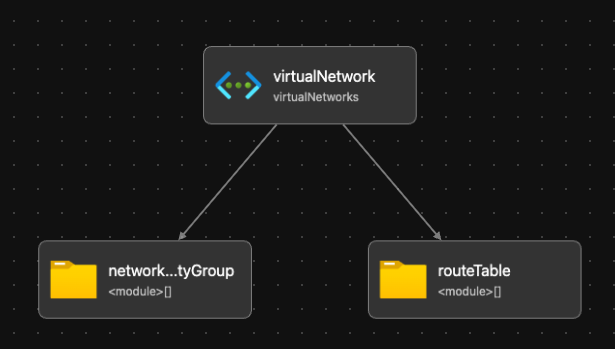
The spokeNetworking.bicepparam file contains the virtualNetwork configuration of a single virtual network, a subnet with an NSG and Route Table.
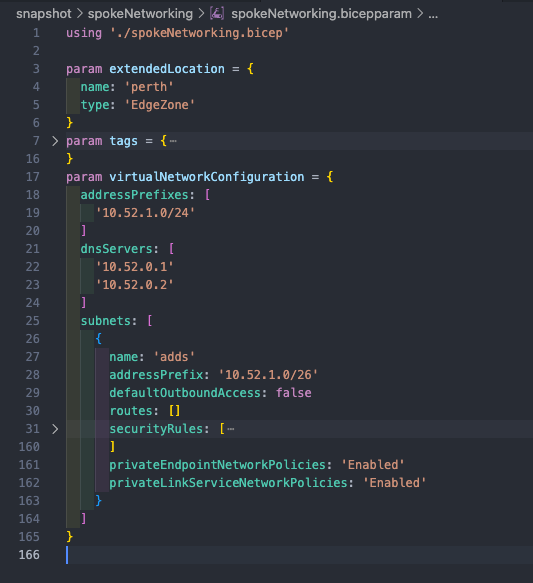
Now we will take a snapshot of the bicepparam file to create a JSON representation of the deployment, which is essentially the local state.
# Create a json snapshot of the bicepparam file
bicep snapshot spokeNetworking.bicepparam --mode overwrite --location australiaeast
The spokeNetworking.bicepparam will be updated to reflect new changes.
- Criticality tag from
Tier0toTier1 - Add a new DNS Server
10.52.0.3 - Added a new subnet
adds2(no NSG or Route Table associated)
# Validate the bicepparam file against the last snapshot
bicep snapshot spokeNetworking.bicepparam --mode validate --location australiaeast
Execution of the validate command will show the differences between the current bicepparam file and the last snapshot taken. This is all local and has no dependency on Azure.
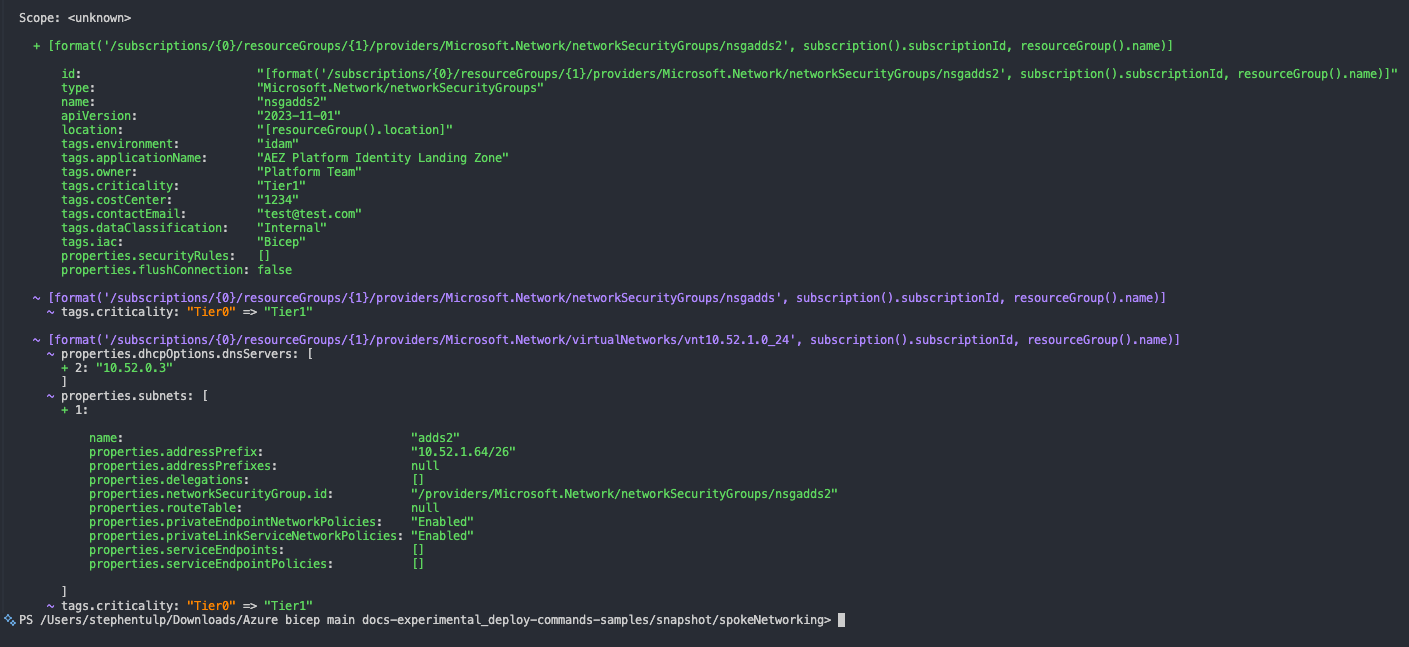
This will only work with .bicepparam templates to reflect the parameters used during deployment. If you change a hard-coded value in the Bicep file itself, that won’t be captured in the snapshot. A colleague has gone into more detail on this feature in his blog post Bringing ‘statefulness’ to Azure Bicep in Pull Requests, including how to use it in a CI/CD pipeline.
Expandable Parameters
The extend keyword lets you build on existing .bicepparam files instead of duplicating parameters across multiple deployments. Think of it as parameter inheritance—define your common values once, then extend them for specific scenarios. The diagram below shows the Bicep and parameter files with reference to the core.bicepparam file.
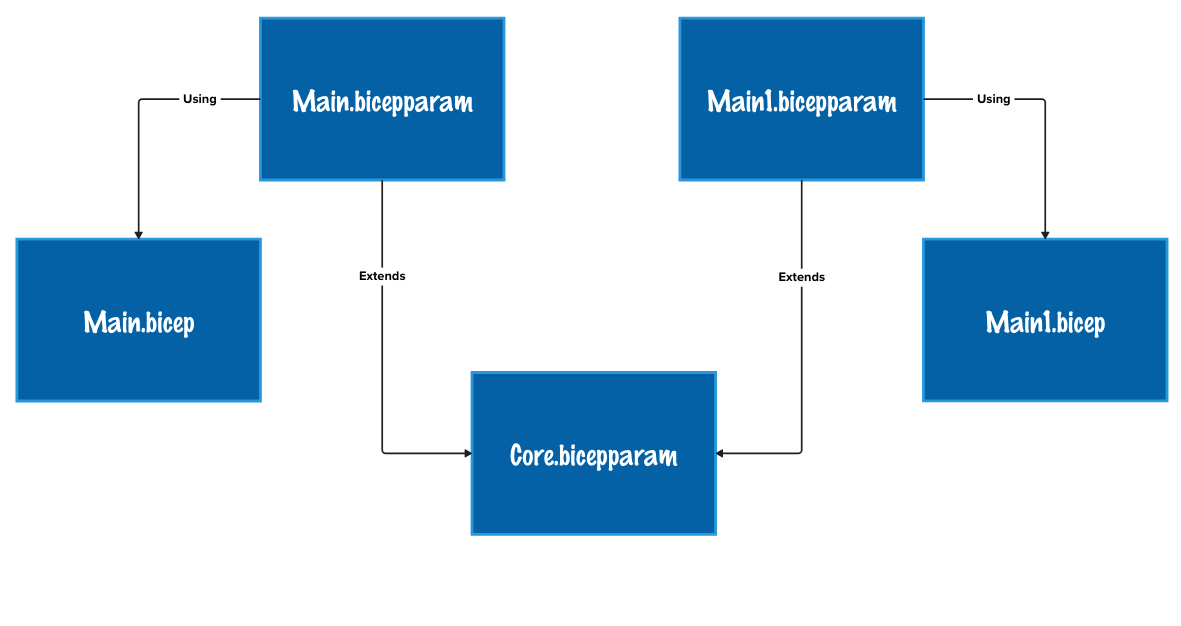
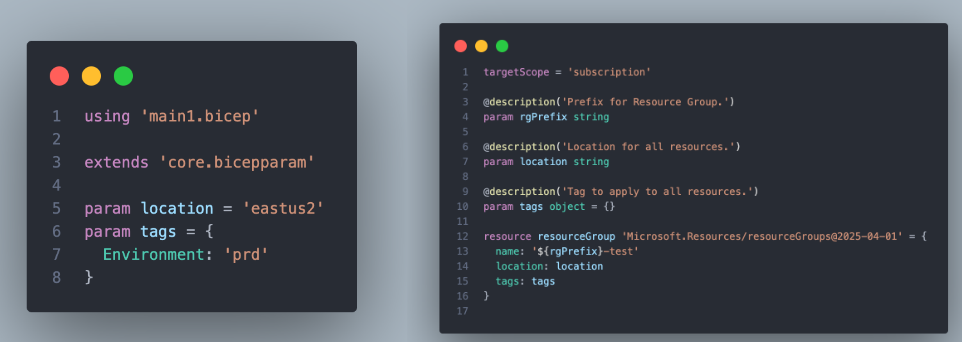
Any parameter values in main.bicepparam or main1.bicepparam file will override the values of the parameter in main.bicep & main1.bicep and core.bicepparam files. Let’s look at some example code to see how this works in practice.
Main.bicep & Main.bicepparam
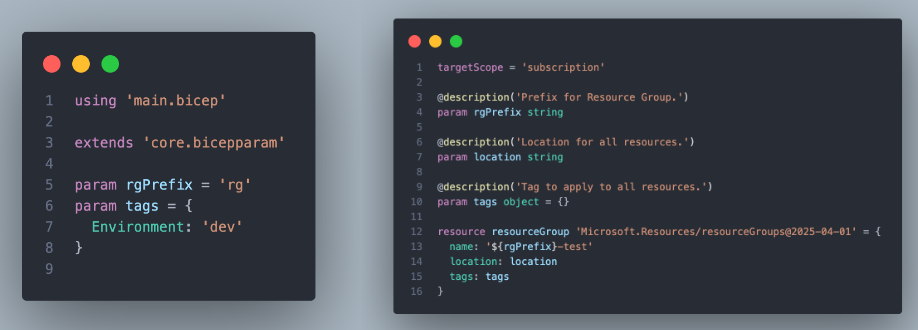
Main1.bicep & Main1.bicepparam
Core.bicepparam

The resolved values for both deployments would be:
| Deployment | Parameter | Value |
|---|---|---|
| Main | rgPrefix | arg |
| location | eastus2 |
|
| tags | { "Environment": "dev" } |
|
| Main1 | rgPrefix | rg |
| location | australiaeast |
|
| tags | { "Environment": "dev" } |
Conclusion
There are many experimental features in Bicep, each at different stages of development. I’m particularly looking forward to Bicep Local Deploy and the Snapshot feature, which will work well alongside What-If and Deployment Stacks to provide a more complete Infrastructure as Code experience.