
Bringing 'statefulness' to Azure Bicep in Pull Requests
 Trent Steenholdt
December 4, 2025
15 minutes to read
For many years, I have longed for Bicep to offer something that feels even slightly state aware. Anyone who has worked with Bicep for long enough knows the common review problem. A change to a parameter file or template looks innocent on paper (or a wall of code), yet the actual impact in Azure may be a resource replacement or a subtle property change that is nowhere near obvious to the reviewer.
Microsoft’s answer to this challenge is Deployment Stacks, but adopting them means a considerable shift in process, permissions and operational thinking. Many organisations, myself included, are not ready to commit production platforms to an entirely new resource management pattern, especially while the guidance and tooling for large scale platforms is still evolving.
What about WhatIf though?
Many in the industry instead rely on Azure ARM WhatIf. While it is considered the default way to preview expected behaviour for ARM or Bicep deployments, anyone who has used it in real engineering conditions knows its limits (and the sheer amount of white noise it produces). WhatIf needs to talk directly to Azure, even with the NoProviderRBAC options. It must run with real credentials and it must reach the platform, subscription or resources to understand the current state. In other words, it has to fly very close to the sun.
That is fine when you have very controlled governance inside your release (CD) pipeline. It becomes a completely different story inside a pull request. No team is going to provide live Azure credentials to a PR validation process (the risk is simply too great). A contributor could bypass deployment controls, trigger unintended changes, or escalate their access, especially when no organisation that values the principles of a good PR process (always test, never block) is going to place approval gates on a pull request just to run WhatIf.
So with that, WhatIf remains an operational tool, not a review tool. It sits after the pull request has been approved. By the time WhatIf runs, reviewers have already made decisions without a clear view of real impact and have generally made their bed very messy in main.
You can read my true thought about WhatIf over at Anti-Pattern 8: Relying on Azure What-If as a Testing and Validation Tool
What does snapshot change?
Snapshot validation changes that dynamic. It gives you a view of predicted change without touching Azure and without exposing any credentials. For the first time, Bicep users can generate a meaningful preview inside the pull request itself (or at least not so close to the sun), well before any deployment credentials enter the picture.
First some notes about snapshot
With the release of Bicep CLI version 36.1, we gained a feature that finally offers something meaningful. It is called snapshot validation. While it is not a complete state system, it is the closest that Bicep/ARM (without Deployment Stacks) has ever come to giving users clarity about expected change.
Snapshot commands are a preview feature, so I would encourage their usage in their own dedicated pipeline or scripting process, so as not to disrupt or break your existing PR processes or pipelines if anything suddenly changes.
How does snapshot validation actually work?
Before walking through workflows and automation, it helps to understand what a Bicep Snapshot actually is and why it gives Bicep something that feels close to state awareness. A snapshot is a captured view of what the Bicep CLI believes the deployed resources look like at a specific point in time. It is not pulled from Azure, it does not rely on live state, and it does not require any credentials. The view is assembled entirely from your templates and parameter files.
When you run a snapshot command, Bicep produces a JSON file named <name>.snapshot.json that represents the predicted resources, their types, their names, and their properties. The easiest way to think about this is that it behaves a little like a very lightweight Terraform state file, but created from the template rather than from the platform. It is simply the Bicep CLI describing what your deployment would look like if applied.
The intended workflow is straightforward in how the CLI command would be used in a repository setting. You would normally:
- Generate a static
<name>.snapshot.jsonfile before making any changes (for examplebicep snapshot myfile.bicepparam) - Commit that snapshot to your repository
- Modify your Bicep and parameter files in a branch
- Regenerate the snapshot based on your changes
- Commit the updated snapshot as part of the pull request
This approach is explained in Brian’s excellent overview of snapshotting.
The challenge with this approach is that it introduces additional noise into your pull request. If your change already touches Bicep and parameter files, adding a third file to compare can dilute the review process. In some cases it can even take attention away from what actually matters (the actual deployable code), which goes against the practice of maintaining clean and focused reviews that I have written about previously in Anti Pattern 9: Poor Pull Request Reviews.
So how do we make it more informed?
The good news is that we can avoid committing snapshot files altogether. Instead of treating snapshots as version controlled artefacts, we can generate them on the fly inside a pull request pipeline. This keeps your repository clean and reduces noise, while still giving reviewers the insight they need.
By combining a PR pipeline with a wrapper PowerShell script, we can avoid storing any static snapshot files in the repository. We do this in the PR pipeline by:
- Checking out
main - Checking out the pull request branch
- Generating a fresh snapshot from the code in
main - Copying that snapshot into the pull request workspace
- Running
bicep snapshot --mode validatetogether with a wrapper script that produces a clear and readable diff summary
This approach shifts snapshotting from a manual review burden to an automated comparison step. Reviewers see only the predicted changes in a summary rather than the raw snapshot files, and the pull request stays focused on meaningful differences.
The pipeline
Here is the full pipeline you can drop into your repository.
name: PR - Bicep Snapshot

on:
  pull_request:
    branches:
      - main
    paths:
      - 'src/**' # path to your bicepparam and bicep files

concurrency:
  group: $_$
  cancel-in-progress: true

env:
  azureLocation: 'australiaeast'

jobs:
  validate:
    name: Bicep snapshot validation
    runs-on: ubuntu-latest
    permissions:
      contents: read
      pull-requests: write

    steps:
      # Check out main branch
      - name: Check out main
        uses: actions/checkout@v6
        with:
          ref: main
          path: main
          fetch-depth: 0

      # Check out PR branch
      - name: Check out PR
        uses: actions/checkout@v6
        with:
          repository: $
          ref: $
          path: pr
          fetch-depth: 0

      # Find changed param files
      - name: Find changed bicepparam files
        id: find
        shell: pwsh
        run: |
          cd pr

          # explicit fetch to guarantee origin/main exists
          git fetch origin main

          $changed = git diff origin/main...HEAD --name-only |
            Where-Object { $_ -like "*.bicepparam" }

          if ($changed.Count -eq 0) {
            echo "none=true" >> $env:GITHUB_OUTPUT
            exit 0
          }

          $list = $changed -join "`n"

          echo "list<<EOF" >> $env:GITHUB_OUTPUT
          echo $list >> $env:GITHUB_OUTPUT
          echo EOF >> $env:GITHUB_OUTPUT

      - name: Exit early when nothing changed
        if: steps.find.outputs.none == 'true'
        run: echo "No changed bicepparam files"

      # Generate snapshots in main workspace
      - name: Generate main snapshots
        if: steps.find.outputs.none != 'true'
        shell: pwsh
        run: |
          $files = "$" -split "`n"

          foreach ($f in $files) {
            $src = "main/$f"
            bicep snapshot $src --mode overwrite --location $env:azureLocation
          }

      # Copy main snapshots into PR folder beside the param files
      - name: Copy main snapshots into PR workspace
        if: steps.find.outputs.none != 'true'
        shell: pwsh
        run: |
          $files = "$" -split "`n"

          foreach ($f in $files) {

            $dir  = Split-Path $f
            $base = [System.IO.Path]::GetFileNameWithoutExtension($f)

            # correct actual snapshot path
            $snap = "main/$dir/$base.snapshot.json"

            if (Test-Path $snap) {
              $target = "pr/$dir/$base.snapshot.json"

              New-Item -ItemType Directory -Force -Path (Split-Path $target) | Out-Null
              Copy-Item $snap $target -Force
            }
          }

      - name: Run ./pr/scripts/Set-BicepSnapshotSummary.ps1
        shell: pwsh
        if: steps.find.outputs.none != 'true'
        id: validate
        run: |
          Write-Information "==> Running script..." -InformationAction Continue
          $files = "$" -split "`n"
          ./pr/scripts/Set-BicepSnapshotSummary.ps1 -ToGitHubSummary -Location $env:azureLocation -Files $files

      - name: Write PR comment
        uses: actions/github-script@v8
        if: steps.find.outputs.none != 'true'
        with:
          github-token: $
          script: |
            const pull_number = context.payload.pull_request.number;
            const repo = context.repo;

            const runUrl = `https://github.com/${context.repo.owner}/${context.repo.repo}/actions/runs/${context.runId}`;

            const marker = '## 💪 Bicep Snapshot Summary';

            // Load existing PR comments
            const comments = await github.rest.issues.listComments({
              ...repo,
              issue_number: pull_number
            });

            // Delete old comments containing the marker
            for (const c of comments.data) {
              if (c.body && c.body.includes(marker)) {
                await github.rest.issues.deleteComment({
                  ...repo,
                  comment_id: c.id
                });
              }
            }

            // Build the new comment
            const reviewBody = `
            ${marker}

            View the snapshot validation report here:
            ${runUrl}

            > **Note**: Please ensure to review the PR file(s) changes carefully, as \`bicep snapshot\` may make mistakes.

            _This comment was generated by a GitHub Action._

            `;

            // Post fresh comment
            await github.rest.issues.createComment({
              ...repo,
              issue_number: pull_number,
              body: reviewBody
            });
The PowerShell script
<#
.SYNOPSIS
  Generates a summary of Bicep snapshot validation results for changed parameter files.

.DESCRIPTION
  This script processes a list of Bicep parameter files, runs snapshot validation on each file
  using the Bicep CLI, and generates a summary of the differences found. The summary can be
  output to the GitHub Actions summary, a Markdown file, or the console.

.PARAMETER ToGitHubSummary
  If specified, the summary will be added to the GitHub Actions step summary.

.PARAMETER ToFile
  If specified, the summary will be written to a Markdown file in the docs/wiki/Bicep directory.

.PARAMETER ToConsole
  If specified, the summary will be printed to the console.

.PARAMETER Files
  An array of Bicep parameter files to validate.

.PARAMETER Location
  The Azure location to use for snapshot validation. Default is "australiaeast".

.EXAMPLE
  .\Set-BicepSnapshotSummary.ps1 -ToGitHubSummary -Files "src\configuration\platform\platformConnectivity-hub.bicepparam"
  This example runs snapshot validation on the specified Bicep parameter file and adds the summary
  to the GitHub Actions step summary.

.NOTES
  - Ensure the Bicep CLI (version v0.36.177 or higher) is installed and available in the system PATH before running this script.
  - "bicep snapshot" is a preview feature and may change in future releases.
  - This script assumes it is run in the context of a GitHub Actions workflow when using the -ToGitHubSummary option.

  Author: Trent Steenholdt
  Date: November 2025
#>
[CmdletBinding()]
param(
    [Parameter(HelpMessage = "Output to GitHub summary")]
    [switch] $ToGitHubSummary,

    [Parameter(HelpMessage = "Output to Markdown file")]
    [switch] $ToFile,

    [Parameter(HelpMessage = "Output to console")]
    [switch] $ToConsole,

    [Parameter(HelpMessage = "List of Bicep parameter files to validate")]
    [string[]] $Files = @("src/myfileexample.bicepparam"),

    [Parameter(HelpMessage = "Azure location for snapshot validation")]
    [string] $Location = "australiaeast"
)

$ErrorActionPreference = 'Stop'

# Fall back to console output if no output option specified
if (-not ($ToGitHubSummary -or $ToFile -or $ToConsole)) {
    $ToConsole = $true
    Write-Warning "No output option specified, defaulting to console output"
}

# Normalise and filter out empty entries
$files = $Files | ForEach-Object { $_.Trim() } | Where-Object { $_ -ne '' }

# build summary header
$summary = "## Bicep Snapshot Validation Results`n`n"
$summary += "### Changed parameter files`n"

foreach ($f in $files) {
    $anchor = ($f -replace '[^a-zA-Z0-9]', '').ToLower()
    $summary += "- [$f](#$anchor)`n"
}

$summary += "`n---`n"

function Write-DebugLog($msg) { if ($DebugPreference -eq 'Continue') { Write-Debug "$msg" } }

function Get-ProviderSplit($p) {
    # split $p into multiple lines for better readability
    $maxLength = 60
    if ($p.Length -gt $maxLength) {
        $lines = @()
        for ($i = 0; $i -lt $p.Length; $i += $maxLength) {
            $len = [Math]::Min($maxLength, $p.Length - $i)
            $lines += $p.Substring($i, $len)
        }
        $p = $lines -join "<br/>"
    }
    return $p
}

function Get-CleanedPath($p) {
    # Find the provider segment
    if ($p -match '/providers/([^/]+)/([^''\),\]]+)') {
        $provider = $matches[1]
        $rest = $matches[2]

        $p = Get-ProviderSplit $p

        $providerChain = $provider + '/' + $rest + "<br/><pre>" + $p + "</pre>"

        return $providerChain.Trim()
    }


    # [EXTENSIONRESOURCEID(...)] case
    if ($p -match '\[EXTENSIONRESOURCEID\([^\)]*\)\]') {
        # Extract the resource type inside single quotes:
        # e.g. 'Microsoft.Authorization/roleDefinitions'
        $extMatch = [regex]::Match(
            $p,
            "EXTENSIONRESOURCEID\s*\([^']*'([^']+)'"
        )

        $p = Get-ProviderSplit $p

        if ($extMatch.Success) {
            $resType = $extMatch.Groups[1].Value.Trim()
            return "$resType<br/><pre>$p</pre>"
        }

        # fallback, show the whole expression if type not found
        return "<pre>$p</pre>"
    }

    return $p
}


function Get-SnapshotDiff {
    param(
        [string] $text
    )

    $rows = @()

    # split and normalise line endings
    $lines = $text -split "`n"

    $currentResourcePath = $null
    $currentArrayKey = $null
    $pendingOld = $null

    for ($i = 0; $i -lt $lines.Count; $i++) {

        $raw = $lines[$i]
        $line = $raw.Trim()
        if ($line -eq '') {
            Write-DebugLog "skip blank"
            continue
        }

        # resource block start:  - Microsoft.xxx or  + Microsoft.xxx
        $headerMatch = [regex]::Match($line, '^\s*([+-])\s+(.+)$')
        if ($headerMatch.Success) {
            $mode = $headerMatch.Groups[1].Value  # + or -
            $resPath = $headerMatch.Groups[2].Value
            Write-DebugLog "resource block start: $mode $resPath"

            $propLines = @()

            # skip exactly one blank line AFTER the header
            $j = $i + 1
            if ($j -lt $lines.Count -and $lines[$j].Trim() -eq '') {
                Write-DebugLog "skip single blank line after header"
                $j++
            }

            # now start capturing property lines
            for (; $j -lt $lines.Count; $j++) {
                $propRaw = $lines[$j]
                $propTrim = $propRaw.Trim()

                # stop scanning when next block begins
                if ($propTrim -eq '') { break }
                if ($propRaw -match '^\s*[+-]\s+(?!(\d+\s*:))') { break }
                if ($propTrim -match '^\s*~\s+') { break }
                if ($propTrim -match '^\s*Scope:') { break }

                # capture "key: value"
                $propMatch = [regex]::Match($propTrim, '^([A-Za-z0-9._-]+):\s*(.+)$')
                if ($propMatch.Success) {
                    $key = $propMatch.Groups[1].Value
                    $val = $propMatch.Groups[2].Value.Trim()

                    if ($val.Length -gt 80) {
                        $val = $val.Substring(0, 80) + '...'
                    }

                    $propLines += "${key}: $val"
                }
            }

            $propText = ($propLines -join "<br/>").Trim()
            $propText = "<pre>${propText}</pre>"

            if ($mode -eq '-') {
                Write-DebugLog "emit removed resource: $resPath"
                $rows += [PSCustomObject]@{
                    Path = Get-CleanedPath $resPath
                    Key  = 'resource'
                    Old  = "Omitting:<br/>$propText"
                    New  = ''
                }
            }
            else {
                Write-DebugLog "emit added resource: $resPath"
                $rows += [PSCustomObject]@{
                    Path = Get-CleanedPath $resPath
                    Key  = 'resource'
                    Old  = ''
                    New  = "Adding:<br/>$propText"
                }
            }

            # move index forward
            $i = $j - 1
            continue
        }


        Write-DebugLog "line: $line"

        # tilde resource header: ~ Microsoft.xxx   (no colon)
        $resMatch = [regex]::Match($line, '^\s*~\s*([^:]+)$')
        if ($resMatch.Success) {
            $currentResourcePath = $resMatch.Groups[1].Value.Trim()
            Write-DebugLog "resource header: $currentResourcePath"
            continue
        }

        # array header: ~ properties.x.y: [
        $arrayHeaderMatch = [regex]::Match($line, '^\s*~\s*([A-Za-z0-9._-]+):\s*\[')
        if ($arrayHeaderMatch.Success) {
            $currentArrayKey = $arrayHeaderMatch.Groups[1].Value
            Write-DebugLog "array key start: $currentArrayKey"
            continue
        }

        # inline scalar diff: ~ key: "old" => "new"
        $inlineMatch = [regex]::Match(
            $line,
            '^\s*~\s*([A-Za-z0-9._-]+):\s*(?:"([^"]*)"|(\S+))\s*=>\s*(?:"([^"]*)"|(\S+))'
        )

        if ($inlineMatch.Success) {
            $key = $inlineMatch.Groups[1].Value
            $old = if ($inlineMatch.Groups[2].Success -and $inlineMatch.Groups[2].Value) {
                $inlineMatch.Groups[2].Value
            }
            else {
                $inlineMatch.Groups[3].Value
            }

            $new = if ($inlineMatch.Groups[4].Success -and $inlineMatch.Groups[4].Value) {
                $inlineMatch.Groups[4].Value
            }
            else {
                $inlineMatch.Groups[5].Value
            }

            Write-DebugLog "inline diff: $key old=$old new=$new"

            $rows += [PSCustomObject]@{
                Path = Get-CleanedPath $currentResourcePath
                Key  = $key
                Old  = $old
                New  = $new
            }
            continue
        }

        # array element old: - 0: "value"
        $arrayOldMatch = [regex]::Match($line, '^\s*-\s*(?:\d+\s*:\s*)?"([^"]+)"')
        if ($arrayOldMatch.Success) {
            $pendingOld = $arrayOldMatch.Groups[1].Value
            Write-DebugLog "array old: $pendingOld"
            continue
        }

        # array element new: + 0: "value"
        $arrayNewMatch = [regex]::Match($line, '^\s*\+\s*(?:\d+\s*:\s*)?"([^"]+)"')
        if ($arrayNewMatch.Success) {
            $newVal = $arrayNewMatch.Groups[1].Value
            Write-DebugLog "array new: $newVal"

            if ($currentResourcePath -and $currentArrayKey -and $pendingOld) {
                Write-DebugLog "emit array diff path=$currentResourcePath key=$currentArrayKey old=$pendingOld new=$newVal"
                $rows += [PSCustomObject]@{
                    Path = Get-CleanedPath $currentResourcePath
                    Key  = $currentArrayKey
                    Old  = $pendingOld
                    New  = $newVal
                }
            }
            else {
                Write-DebugLog "array diff missing context, skipping row"
            }

            $pendingOld = $null
            # do not clear $currentArrayKey, there may be more elements
            continue
        }

        Write-DebugLog "ignored: '$line'"
    }

    return $rows
}

foreach ($f in $files) {
    $f = $f.Trim()
    if (-not $f) { continue }

    $paramFile = Join-Path $PSScriptRoot ".." $f
    Write-Host "Processing file: $paramFile" -ForegroundColor Green

    # run bicep snapshot validate
    $output = bicep snapshot $paramFile --mode validate --location $Location 2>&1 | Out-String

    If ($DebugPreference -eq 'Continue') {
        Write-Debug "Raw Bicep snapshot output:`n$output"
    }

    if ($LASTEXITCODE -ne 0) { $LASTEXITCODE = 0 }

    # strip ANSI colours
    $clean = $output -replace "`e\[[0-9;]*m", ""

    # drop output noise
    $clean = $clean -replace '(?m)^[^\r\n]*:\s*(Warning|Info|Error)\b.*$', ''
    $clean = $clean -replace '(?m)^.*BCP\d+:.*$', ''
    $clean = $clean -replace '(?m)^WARNING:.*$', ''
    $clean = $clean -replace '(?m)^Snapshot validation failed\..*$', ''
    $clean = $clean -replace '(?m)^Expected no changes.*$', ''
    $clean = $clean -replace '(?m)^Warning BCP.*$', ''
    $clean = $clean -replace '(?m)^Scope:.*$', ''

    # Trim out any leftover blank lines
    $clean = $clean -split "`r?`n" | Where-Object { $_.Trim() -ne '' } | Out-String

    $clean = $clean.Trim()

    $rows = Get-SnapshotDiff -text $clean

    $anchor = ($f -replace '[^a-zA-Z0-9]', '').ToLower()
    $summary += "`n"
    $summary += "### $f <a id=""$anchor""></a>`n`n"
    $summary += "| Resource Provider | Property | Old | New  |`n"
    $summary += "|---|---|---|---|`n"

    foreach ($r in $rows) {
        # escape pipe characters in values so markdown table stays valid
        $oldEsc = ($r.Old -replace '\|', '\|')
        $newEsc = ($r.New -replace '\|', '\|')
        $summary += "| $($r.Path) | $($r.Key) | $oldEsc | $newEsc |`n"
    }

    $summary += "`nTotal identified changes: $($rows.Count)`n"

    $summary += "`n`n"
    $summary += "#### Raw Snapshot Output`n`n"
    $summary += '```text'
    $summary += "`n" + $clean + "`n"
    $summary += '```'
    $summary += "`n---`n`n"

    Write-Host "Completed processing file: $paramFile" -ForegroundColor Green
}

if ($ToGitHubSummary) {
    # set GitHub Actions summary
    $ghSummaryPath = $env:GITHUB_STEP_SUMMARY
    if ($ghSummaryPath) {
        Write-Output $summary >> $ghSummaryPath
        Write-Host "GitHub Actions summary written." -ForegroundColor Green
        # force a clean step result in GitHub Actions
        $LASTEXITCODE = 0 # Avoid tee setting non-zero exit code in GitHub Actions
        exit 0
    }
    else {
        Write-Host "GITHUB_STEP_SUMMARY environment variable not set, cannot write summary" -ForegroundColor Yellow
    }
}
elseif ($ToConsole) {
    Write-Host "Bicep Snapshot Summary to console:`n" -ForegroundColor Green
    Write-Host $summary
}
elseif ($ToFile) {
    $outFile = Join-Path $PSScriptRoot "./docs/wiki/Bicep/Bicep-SnapshotSummary.md"
    Write-Host "Writing summary to file: $outFile" -ForegroundColor Green
    Set-Content -Path $outFile -Value $summary
}
What does this look like in practice?
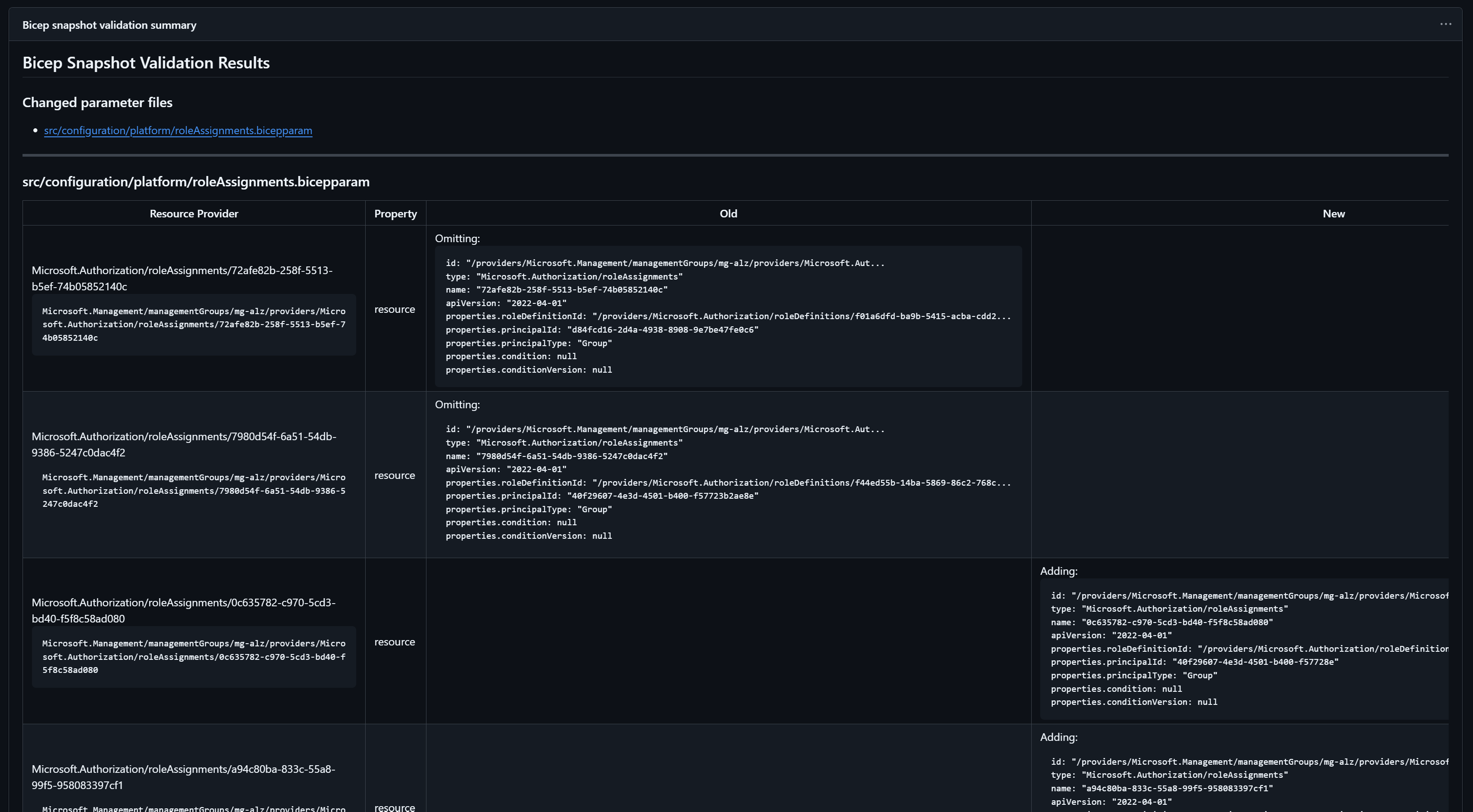
Once the pipeline and wrapper script are in place, every pull request that modifies a .bicepparam file will automatically generate a snapshot comparison. Reviewers do not need to run any commands locally, and no one needs credentials for Azure. The entire process works from source alone.
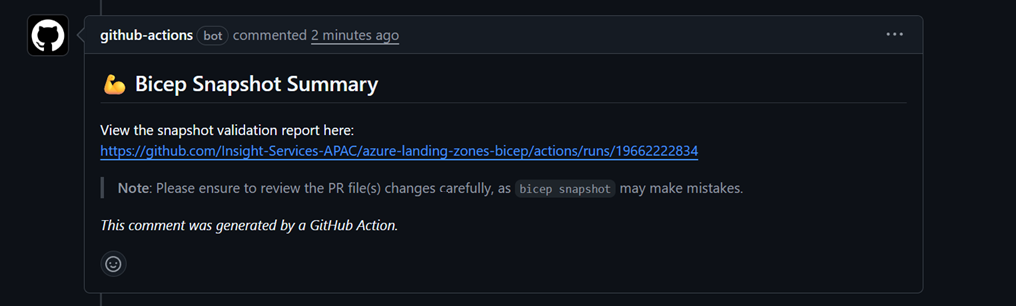
When the workflow completes, a comment is posted back to the pull request showing a link to the run summary. It also called out that snapshot is a predictive model. It is not perfect, but honestly, it is an enormous improvement over reviewing a wall of parameter changes and hoping nothing destructive is hidden inside.
Below is an example of the pull request comment produced by the workflow.
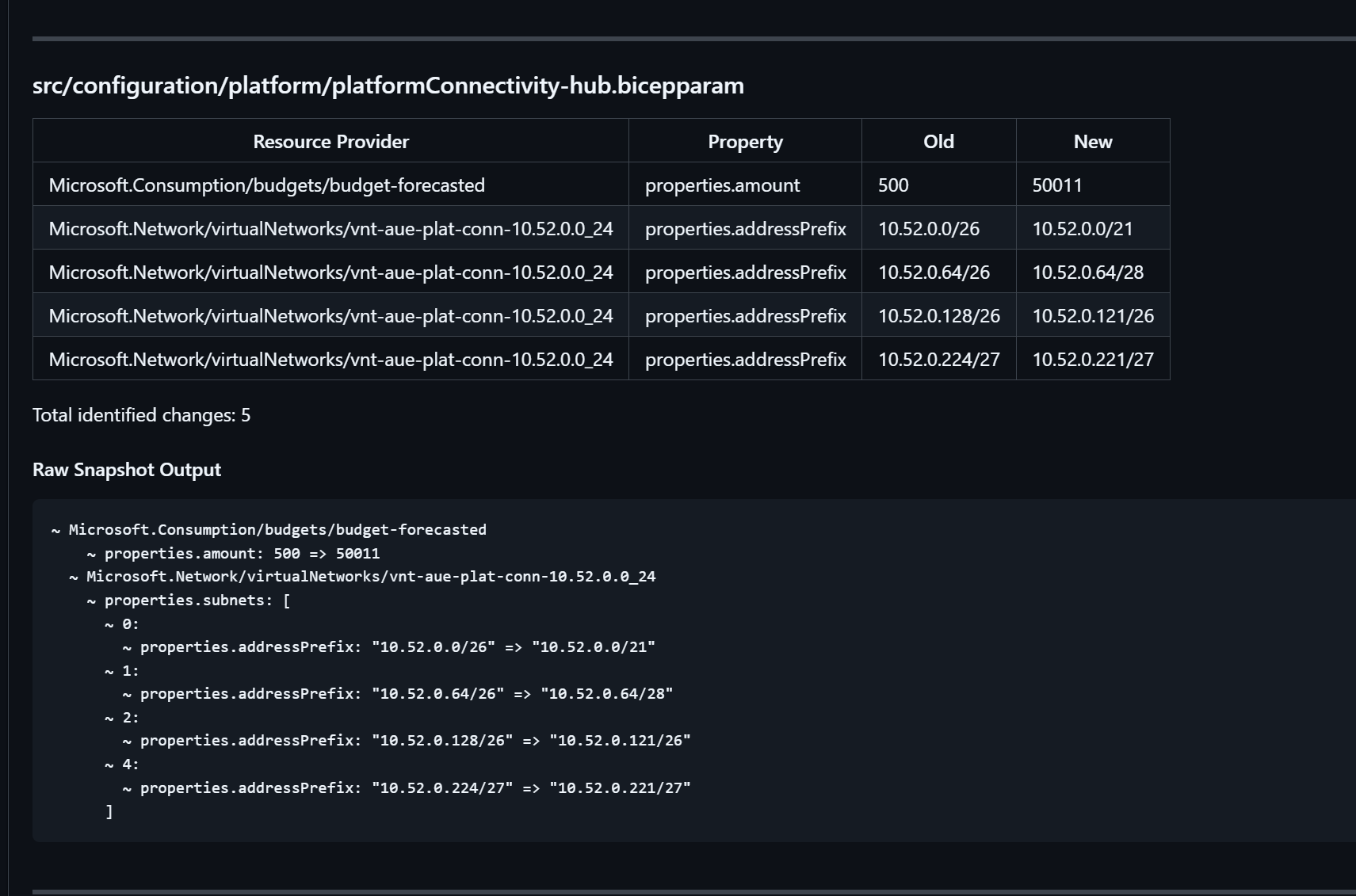
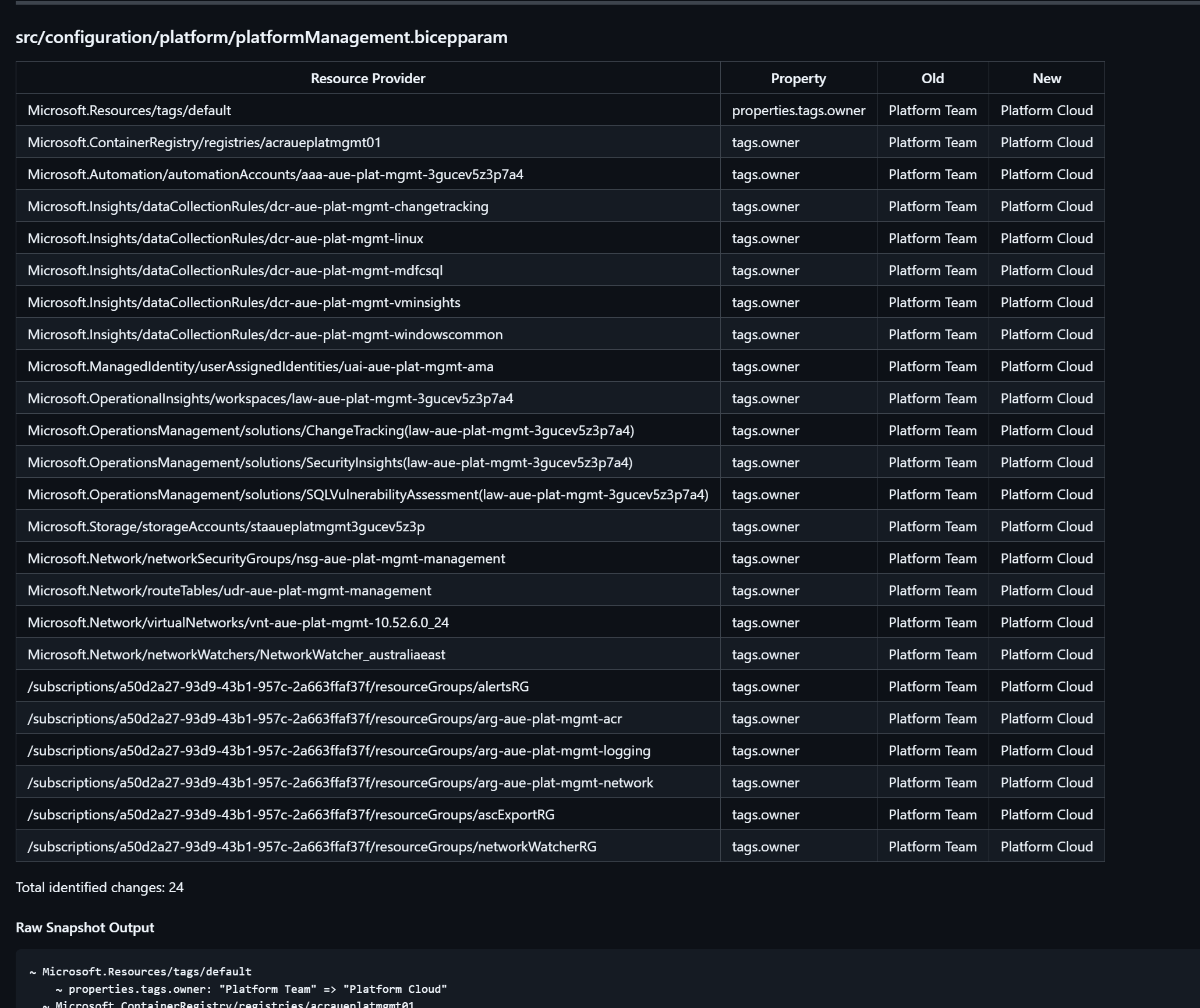
And here is some examples of the rendered summary inside the workflow output:
Conclusion
Snapshot validation does not replace WhatIf or Deployment Stacks and it certainly does not provide true state like Terraform does. What it does offer is something that has been missing from Bicep for a long time: a safe way to preview expected changes without touching Azure and without injecting credentials into a pull request pipeline.
While snapshot is still a preview feature and will evolve over time, it already fills a significant gap in day to day Bicep development. With a small amount of automation and scripting, it becomes a simple and powerful addition to any platform engineering workflow.
If you adopt it, I would recommend watching changes across Bicep releases and continuing to validate snapshot accuracy with real deployments. As with any preview feature, the more you observe, the more confident you become in how it behaves across different resource types.
Happy coding!