
Jingle Bells, Server Shells, and Context All the Way
 Stephen Tulp
December 3, 2025
10 minutes to read
When working with AI tools like GitHub Copilot, the quality of suggestions depends heavily on the context they can access. Traditionally, getting that context into these tools meant copying and pasting configuration files, switching between terminal windows, and manually feeding information into chat prompts. Model Context Protocol (MCP) aims to fix this by standardising how AI applications connect to data sources and tools.
MCP works like a universal adapter for your development tools. Just as USB-C eliminated the need for different cables and adapters for every peripheral, MCP removes the need to build custom integrations for each service you want to connect. Whether it’s Azure resources, GitHub repositories, or your internal documentation, one protocol handles them all.
MCP Architecture
The MCP architecture is built on a three-tier model that connects AI applications to external data sources and tools through a standardised protocol.
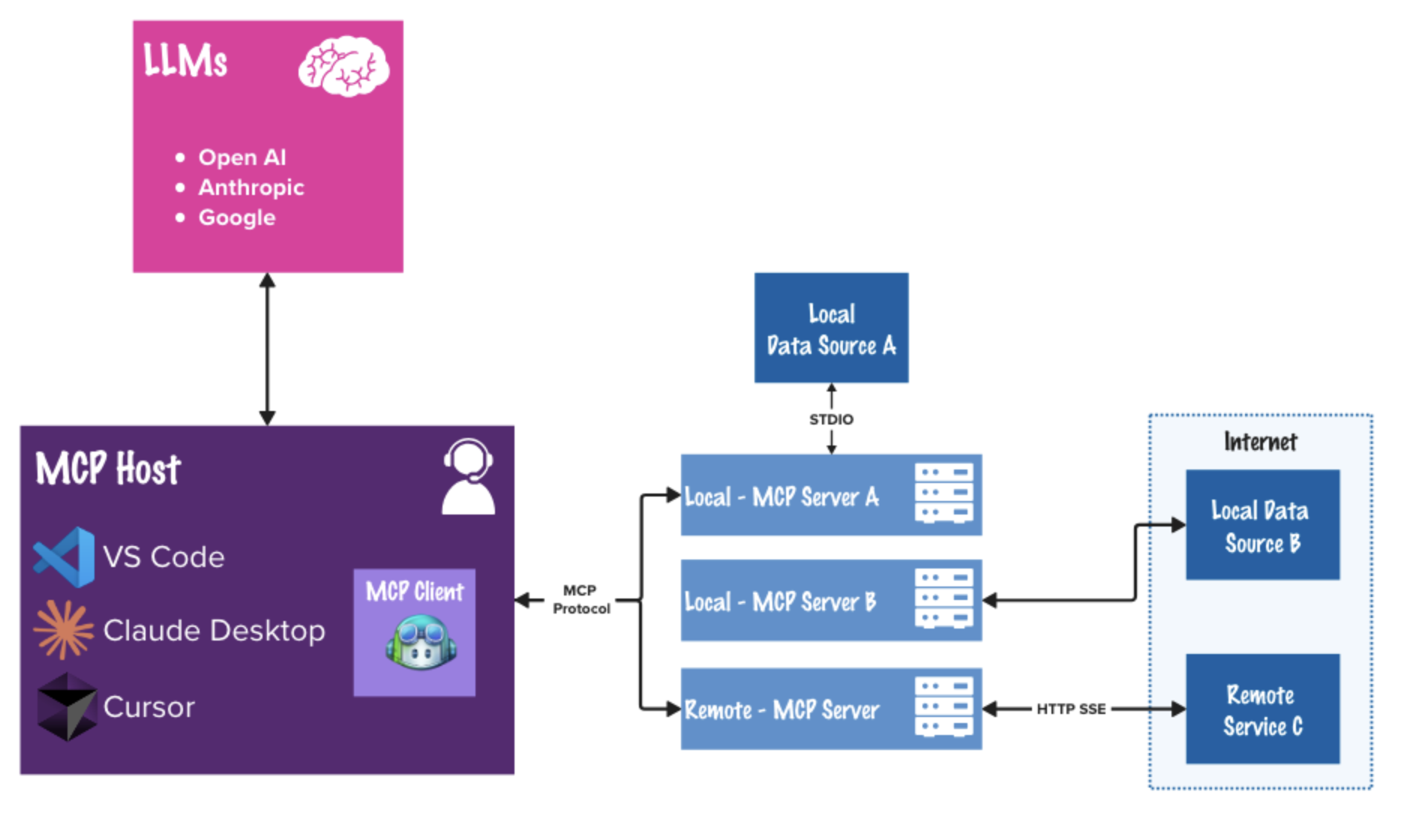
MCP Host
The AI application itself, that could be Visual Studio Code, Claude Desktop, Cursor or many others, that orchestrates connections and manages user interactions.
MCP Client
The Client is a component inside the Host. It maintains a 1:1 connection with a specific MCP Server. If Visual Studio Code connects to three different tools (e.g., Azure, GitHub, and a local database), it spins up three internal Clients to handle those conversations for each connected service.
MCP Server
The Server is a lightweight program that exposes data and capabilities. It wraps a specific service (like the Azure CLI or a SQL database) and translates it into the MCP format. It offers three main things:
- Resources: Read-only data like logs or file contents
- Tools: Executable actions like deploying code or restarting VMs
- Prompts: Pre-written templates to guide AI interactions
The Communication Layer
The architecture uses JSON-RPC 2.0 as its protocol standard, enabling standardised communication between components. It supports:
- Stdio (Standard Input/Output) for local tools
- HTTP for remote services
This design means the Host doesn’t need to understand the internal workings of each Server, as long as both speak “MCP”, they can exchange data seamlessly.
Why Do We Need it?
Before MCP, every time you wanted to connect an AI tool to a new service—whether Azure, GitHub, or your documentation site—you had to build a custom integration.
Here are the key benefits MCP provides over traditional proprietary API integrations:
- Standardisation and Simplified Integration — MCP acts as a universal connector, standardising how systems connect to external data sources and APIs. Instead of building and maintaining separate, often complex connectors for every proprietary API, developers can integrate once with MCP and reuse that integration across multiple projects and models. This reduces code duplication, minimises maintenance overhead, and streamlines onboarding of new tools or data sources.
- Capability Discovery for LLMs — MCP enables LLMs to automatically discover what capabilities are available on a server. This means LLMs can dynamically understand and tap into new functionality, without manual prompt engineering or hardcoding required. The result? AI applications that are more adaptive and extensible out of the box.
- Improved Security, Compliance, and Maintenance — With authentication, access control, and data retrieval managed centrally by MCP, the risk of security breaches and compliance headaches is reduced. There’s no need to store credentials or intermediary data across different systems.
Enhancing Azure Engineering
MCP enables Large Language Models (LLMs) to interact directly with Azure resources and Infrastructure as Code (IaC) tools, changing how engineers manage and interact with cloud infrastructure.
- Stay in the flow: Query database fields, check Azure resource configurations, or create GitHub issues without switching windows. Everything stays within your IDE.
- Natural language queries: Describe what you need instead of remembering exact SQL syntax or CLI parameters. Ask for “production database tables created last week” rather than crafting the precise query.
- Chain operations together: Automate workflows by combining multiple actions. For example, pull recently closed GitHub issues related to your web UI and generate Playwright test stubs for those scenarios.
- Tap into the ecosystem: Beyond the servers covered here, you can connect to a growing catalog of community-built MCP servers across different platforms and services.
- Build your own: Create custom MCP servers to expose your internal services and tooling. The C# MCP SDK and other language bindings make this straightforward.
- Customise with modes and instructions: The Awesome GitHub Copilot Customizations repository offers pre-configured chat modes and prompts that work well with MCP servers for common workflows.
Getting Started MCP
To help get started, I have curated a list of MCP servers that I use regularly:
| MCP Server | VS Code Link |
|---|---|
| Awesome Copilot MCP Server |  |
| Microsoft Learn MCP Server | |
| GitHub MCP Server | |
| Microsoft Markdown MCP Server |  |
| Bicep MCP Server | |
There is also a Microsoft MCP Servers repo that lists many more MCP servers that you can explore.
Awesome Copilot MCP Server
The Awesome Copilot MCP Server provides curated collections of specialised agents, prompt templates, and custom instructions designed to enhance GitHub Copilot’s capabilities. Whether you’re working with specific programming languages, frameworks, or industry domains, this server delivers context-aware guidance and best practices to accelerate your development workflow.
Bicep MCP
The Bicep team added experimental MCP server support in version 0.37.4, bringing the power of Model Context Protocol directly to your Infrastructure as Code workflows.
There are currently 4 Bicep MCP tools available:
- get_bicep_best_practices: Lists up-to-date recommended Bicep best-practices for authoring templates. These practices help improve maintainability, security, and reliability of your Bicep files. This is helpful additional context if you’ve been asked to generate Bicep code.
- list_az_resource_types_for_provider: Lists all available Azure resource types for a specific provider. The return value is a newline-separated list of resource types including their API version.
- get_az_resource_type_schema: Gets the schema for a specific Azure resource type and API version. Such information is the most accurate and up-to-date as it is sourced from the Azure Resource Provider APIs.
- list_avm_metadata: Lists up-to-date metadata for all Azure Verified Modules (AVM). The return value is a newline-separated list of AVM metadata. Each line includes the module name, description, versions, and documentation URI for a specific module.
The Bicep MCP works closely with what we covered yesterday Deck the IDE: Supercharging GitHub Copilot with Awesome Customisations where we can now combine the MCP server with custom prompts to generate Bicep code that adheres to best practices and uses the latest resource schemas.
Microsoft Learn MCP
The Microsoft Learn Docs MCP Server connects AI assistants directly to official Microsoft documentation through real-time semantic search.
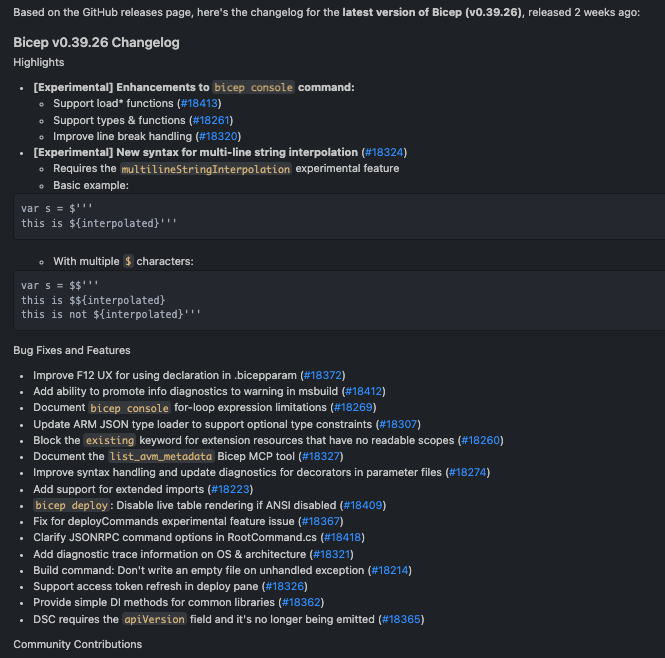
Example query: “Get me the change log for the latest version of bicep.”
The results showcase experimental features, bug fixes and features and some community contributions.
GitHub MCP Server
The GitHub MCP Server provides integration with the GitHub platform, enabling AI-powered workflows across your entire development lifecycle:
- GitHub Actions: Manage CI/CD pipelines, monitor workflow runs, and handle build artifacts
- Pull Requests: Create, review, merge, and track PR status with full lifecycle management
- Issues: Complete issue management including creation, commenting, labeling, and assignment
- Security: Access code scanning alerts, secret detection, and Dependabot vulnerability tracking
- Notifications: Intelligently manage notifications and repository subscriptions
- Repository Management: Perform file operations, manage branches, and administer repositories
- Collaboration: Search users and organisations, manage teams, and control access permissions
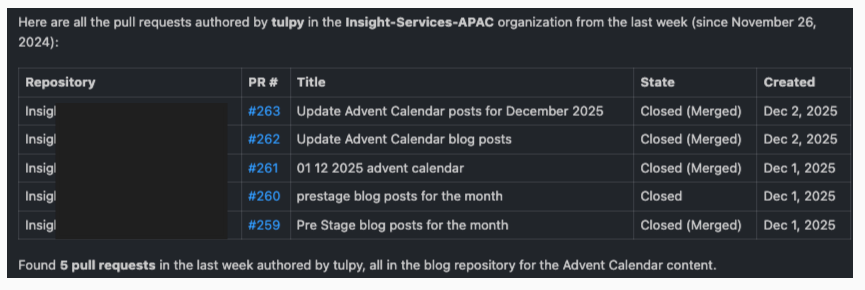
Example query: “Show me all my Pull requests in the last week in the Insight-Services-APAC organisation with the author as tulpy”
The results show all my open Pull Requests in the last week, no idea why it has November 2024!
Microsoft Markitdown
MarkItDown is a document conversion MCP server that transforms diverse file formats (PDF, Office documents, images, audio, web content, data files, and more) into high-quality Markdown while preserving structure like headings, lists, and tables. It’s optimized for LLM consumption and includes advanced features like OCR, speech transcription, and Azure Document Intelligence integration.
Example query: “Extract text from this PDF with proper heading structure”
I was recently working with a customer that had a formal design document in PDF format, they wanted to convert it into a more editable format and stored in Github. By using MarkItDown MCP server, I was able to quickly extract the content into Markdown format, preserving the heading structure for easy reading and further editing.
Conclusion
Model Context Protocol represents a shift in how AI applications interact with the tools and data that you use everyday. By providing a standardised, vendor-agnostic protocol, MCP eliminates fragmentation and what I call “Blutack and sticky tape” approach to cloud engineering. What makes MCP great is it’s an open standard, where you can seamlessly combine Microsoft’s Azure MCP with GitHub’s repository management and Bicep for Infrastructure as Code. All of these integrations work together through the same standardised protocol, giving you the freedom to build workflows that match your specific needs.
For Azure engineers and platform teams, MCP offers immediate practical value. The ability to query live infrastructure state, validate IaC deployments, and troubleshoot issues without leaving your IDE means less context switching and more productive development time. Combined with GitHub Copilot’s AI capabilities, MCP servers transform how we interact with cloud infrastructure—making complex operations feel as natural as having a conversation.
Next week we will go through Lokka MCP, which is an MCP server that uses Microsoft Graph to connect to your Azure and Microsoft 365 tenant.