
All I want for Christmas is Azure Verified Modules
 Stephen Tulp
December 10, 2025
8 minutes to read
Tired of reinventing the wheel every time you deploy Azure infrastructure? Azure Verified Modules (AVM) are Microsoft-supported, production-ready IaC templates that follow the Microsoft Well-Architected Framework out of the box. Available for both Bicep and Terraform, these reusable modules eliminate guesswork and accelerate your deployments while ensuring you’re following Azure best practices from day one.
I have previously spoken about Azure Verified Modules, the links below provide a great foundation and context to understand what they are and how to get started:
- The Future of Bicep Modules using Azure Verified Modules - December 12th 2023
- Unlocking the Power of Azure Verified Modules for Infrastructure as Code and Platform Engineering - Part 1 - December 9th 2024
- Unlocking the Power of Azure Verified Modules for Infrastructure as Code and Platform Engineering - Part 2 - December 10th 2024
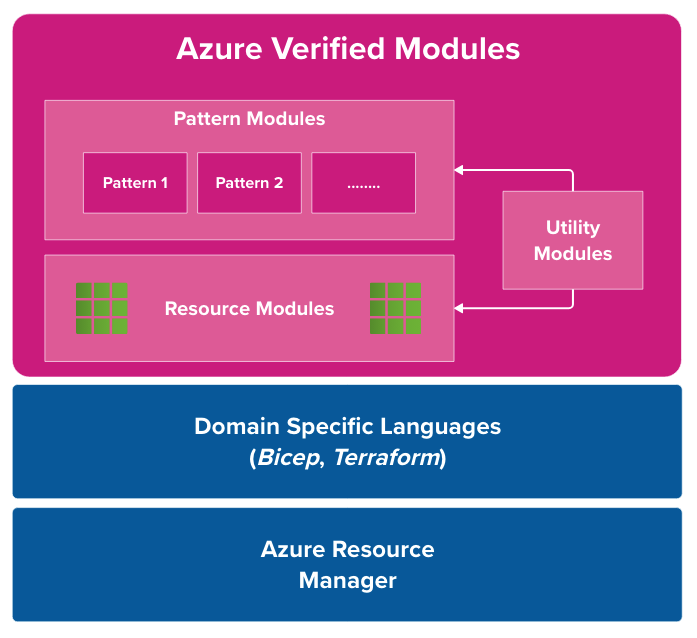
If you haven’t been across this initiative before, the diagram above and the sections below provide a high-level overview of what Azure Verified Modules are across the 3 module types. The official Azure Verified Modules documentation provides more details on the specification and also past community calls that I also highly recommend checking out.
Resource Modules
Resource Modules are individual Azure resources (like VMs, storage accounts, or SQL databases) with WAF best practices baked in, this could be availability zones, private endpoints, and proper RBAC. They include necessary child resources (a VM gets its disks and NICs) but skip external dependencies (you bring your own VNet). Perfect for building custom architectures brick by brick.
Pattern Modules
Pattern Modules combine multiple Resource Modules to deploy complete architectures, including architectures like landing zones, hub-and-spoke networks, or three-tier apps. They’re based on proven designs from the Azure Architecture Center and only reference other AVM modules to maintain quality. Ideal for teams who want to deploy entire solutions in one shot.
Utility Modules
Utility Modules (still in draft) are reusable helper functions for module authors—like retrieving API endpoints or environment-specific values. They don’t deploy resources, just provide common logic to avoid code duplication across your modules.
What is New in Azure Verified Modules?
Some new updates and features have been added to Azure Verified Modules that are worth highlighting.
Child Modules
One of the challenges in the early days of Azure Verified Modules was handling resources that exist within the scope of a parent resource. None were more apparent or frustrating than Subnets within Virtual Networks. The northstar guidance and approach for Subscription Vending centered around providing an application landing zone with a virtual network and some other security and governance resources. But what about the subnets? You couldn’t deploy them separately, and you couldn’t modify them without redeploying the entire virtual network. Enter Child Modules.
In the Azure Verified Modules (AVM) ecosystem, Child Modules are specialised modules dedicated to deploying resources that exist only within the scope of a parent resource—such as a subnet within a virtual network or a database within a SQL server. While typically orchestrated automatically by their parent module to ensure a complete deployment, AVM’s architecture allows these child modules to be treated as standalone units. This design offers significant benefits, including better separation of concerns and the ability to bypass complex nested loop limitations in ARM. Crucially, when published independently, child modules empower Day 2 operations.
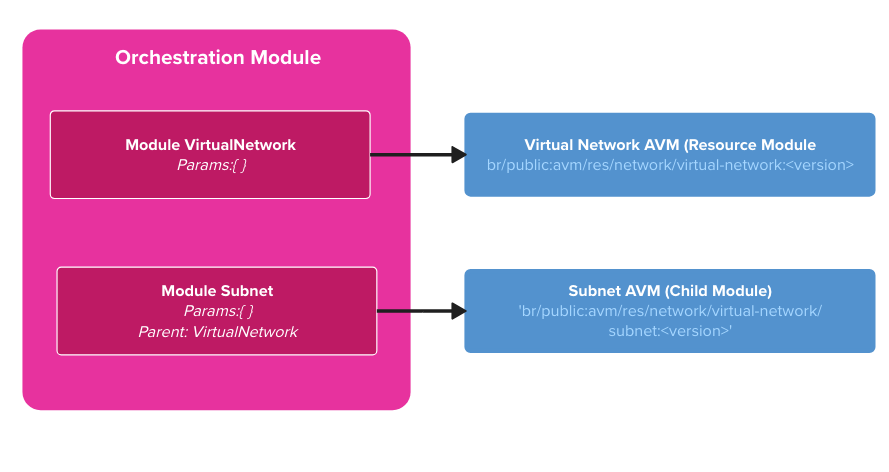
Child modules are covered @ 1h:15min:19sec in the Azure Verified Modules (AVM) - December 2025 - External Community Call
New Pattern Modules
The AVM team has been busy adding new Pattern Modules to the repository with a big focus on AI Platforms with Azure AI Foundry and associated services seeing the most recent additions. The AVM website has a full list of Bicep Pattern Modules and covers published, planned and deprecated modules.
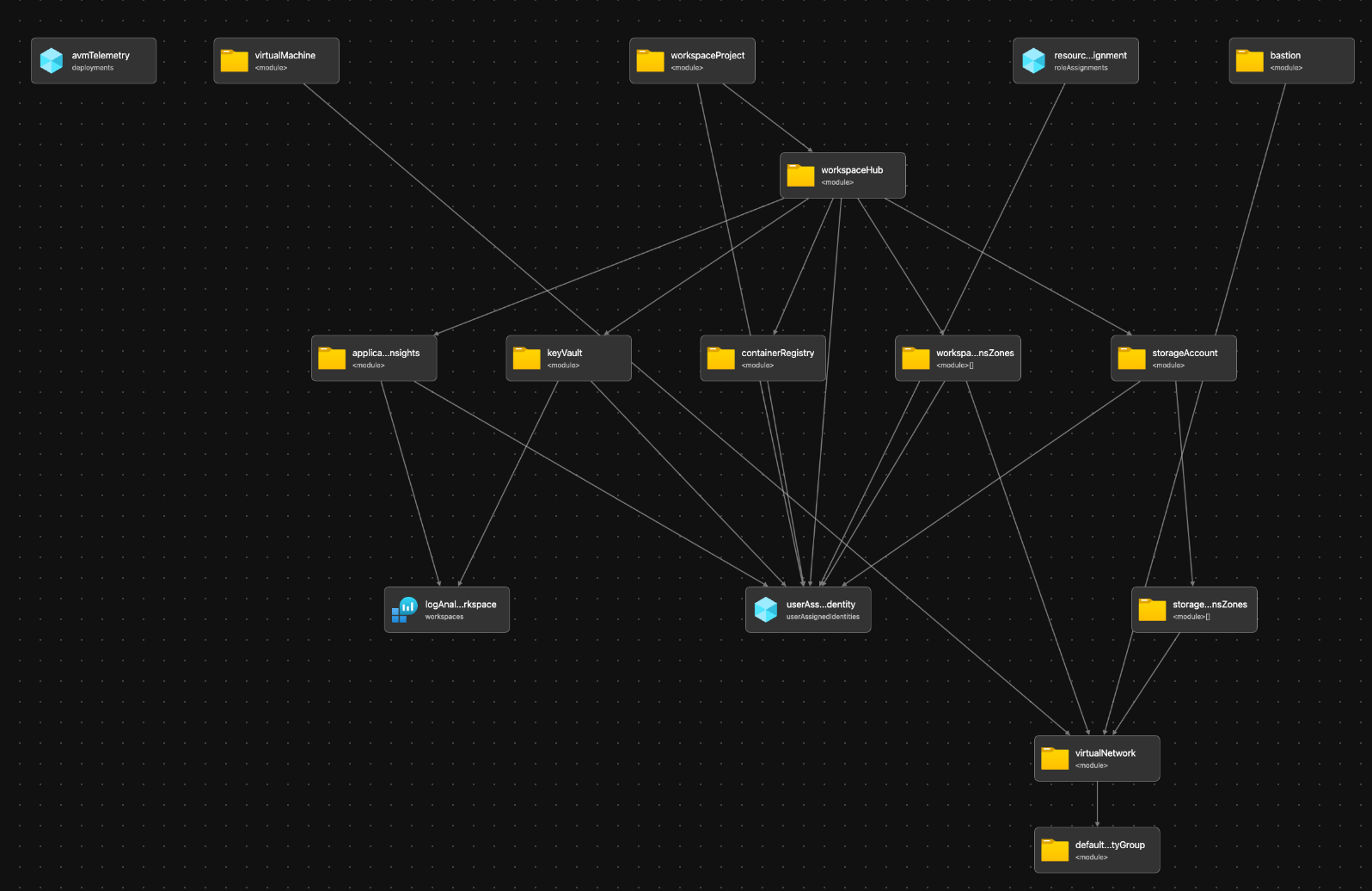
A lot of the complexity of pattern modules is hidden away and abstracted from the end-user, so only the necessary parameters are exposed to make it easy to consume. In the diagram below we can see the Bicep visualiser output of the ai-platform pattern module, which deploys multiple resource modules and child modules to provide a complete AI Platform architecture.
The 4 MB Limit Challenge
While not specifically an Azure Verified Modules limitation, Bicep has a known limitation of 4 MB for compiled templates. This can be a challenge when working with large deployments or complex modules. It has been a blessing and a curse with Azure Verified Modules, as the modular approach encourages reuse and composition, which can lead to larger compiled templates. This is becoming a more prominent issue as Pattern Modules grow in complexity and size, I recently blogged about this across a 2 part series Part 1 and Part 2.
The good news is that this is being revisited with the Bicep team and there are plans to increase this limit in the future. This was also addressed @ 1h:23min:23sec in the Azure Verified Modules (AVM) - December 2025 - External Community Call
How they are used at Insight
For me and my team, Azure Verified Modules are our starting point for any Infrastructure as Code development. There are multiple ways we consume these modules, whether that be directly referencing a Resource or Pattern module as is, building our orchestration/pattern modules that references Resource and/or Pattern module as building blocks for custom solutions, and now leaning on the Bicep MCP Server and Coding agents to pass natural language and requirements to generate Bicep code that leverages Azure Verified Modules and our specific governance standards.
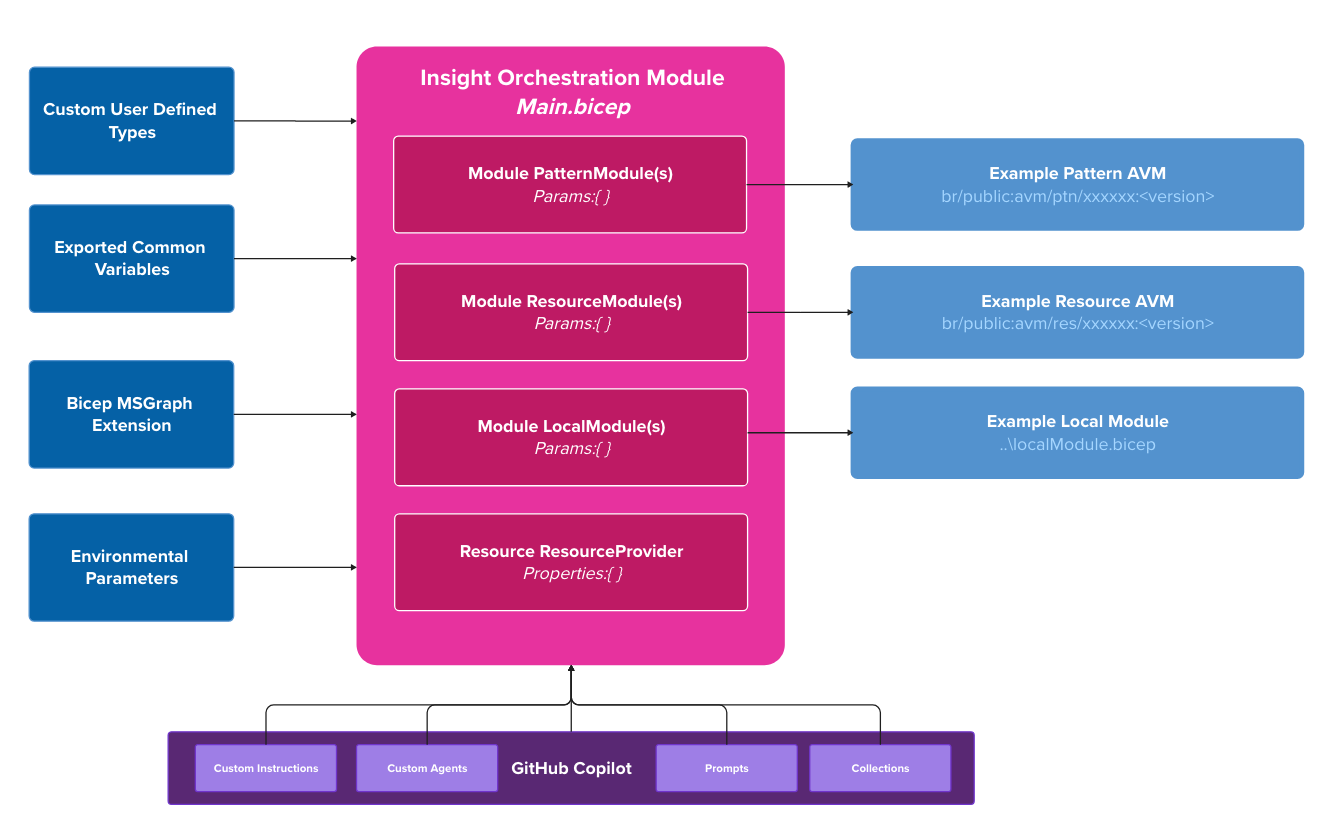
In week 3 we will delve deeper into some of these orchestration patterns and how we leverage Azure Verified Modules to build scalable and maintainable infrastructure solutions, but for now the diagram above can be summarised into the following points:
There is an orchestration Bicep module (think main.bicep), this can include 1 or more Modules or resource deployments, depending on the scope of the deployment (Subscription, Resource Group, Management Group)
- AVM Pattern or Resource Modules
- Local modules that encapsulate our specific governance, standards and naming conventions
- Resource deployments that are not yet available as AVM modules
- Custom User Defined Types provide strong intellisense and validation for parameters
- Common variables and/or functions that are imported into the orchestration module
- Leverage the MSGraph extension for provisioning of Entra ID resources (If required)
- Environmental
.bicepparamfiles that provide specific values for different environments (Dev, Test, Prod) - All supported by GitHub Copilot tools and MCP Servers
Conclusion
Azure Verified Modules is the gold standard and should be your first port of call when building Azure infrastructure as code. They provide a solid foundation built on Azure best practices, saving you time and effort while ensuring your deployments are secure, scalable, and maintainable. By leveraging AVM, you can focus on delivering value to your applications and services rather than reinventing the wheel with every deployment. Tomorrow we will look at Continuous Integration and Continuous Deployment (CI/CD) approaches for Bicep deployments.