
Dear Santa, I've Been Writing Bicep Docs: A Letter to the North Pole
 Stephen Tulp
December 9, 2025
6 minutes to read
There are three things in life that never change: Death, taxes, and IT folks not updating documentation. You could probably expand that to actually writing it in the first place too. When it comes to Infrastructure as Code (IaC), having well-documented templates is crucial for maintainability and collaboration. They help teams understand the purpose and functionality of each component, making collaboration smoother and reducing the learning curve for new team members. Comprehensive documentation also aids in troubleshooting and maintenance, as it provides clear insights into the design decisions and configurations used in the templates.
What is Bicep Docs?
Bicep-docs is a command-line tool created by Christos Galanopoulos that automatically generates markdown documentation for Bicep templates. There are many options to parse a single file or a directory structure of templates.
- If the input is a directory, then for each
biceptemplate it will generate aREADME.mdin the same directory. This happens recursively for all subdirectories. - If the input is a Bicep file, the output must be a file; otherwise, an error will be returned.
Document Structure
The diagram below shows the structure of the generated documentation, the default sections ordered are description, usage, modules, resources, parameters, udfs, uddts, variables, outputs.
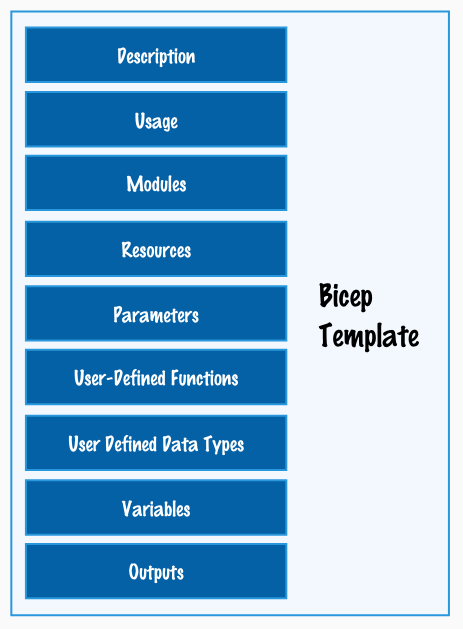
There are two arguments that can be used to control the sections that you want included, --include-sections and --exclude-sections. The order of the sections is respected when including them and when excluding sections, the result will be the default sections minus any excluded ones. This gives you flexibility to customise the documentation to have the right level of detail that you need.
Installation and Prerequisites
To run bicep-docs, either the Azure CLI or the Bicep CLI must be installed.
| CLI | Minimum Required Version |
|---|---|
| Azure | 2.77.0 |
| Bicep | 0.38.0 |
Installation is also straightforward using either Homebrew or Chocolatey.
- Homebrew
- brew tap christosgalano/christosgalano
- brew install bicep-docs
- Chocolatey
- choco install bicep-docs
Example Usage
To generate documentation for the example Bicep module, it’s first important to understand the structure of the module that I have.
Metadata- Name, Description, Version and Author information about the module.Import- Using the Import function to bring in shared configuration values (think location Id, Resource Id etc) from a central configuration file. Also custom User Defined Types (UDTs) are imported to enforce standards across resource providers.Modules- Reference Azure Verified Modules (AVM) where possible or local modules if specific logic or things above and beyond AVM is required.
To generate documentation for the Bicep file, we will run the following command. You can do this interactively in your terminal or include it as part of a CI/CD pipeline. The example Bicep template can be found in the Advent Calendar 2025 repository.
# -i indicates the input file and -V is for verbose output
bicep-docs -i spokeNetworking.bicep -V
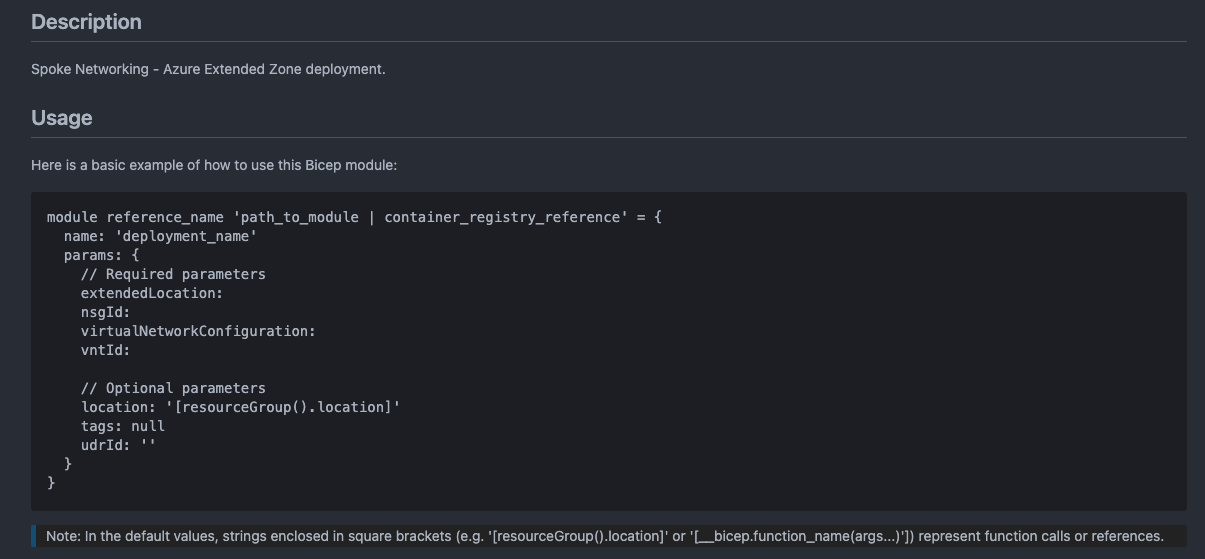
Description and Usage
Outline the metadata description and details on how to consume the module from an orchestration template with the required and optional parameters.
Modules and Resources
Modules, either referenced from AVM or local modules, are listed first followed by the resources that are directly declared in the Bicep file. This gives a clear overview of the building blocks used in the template.

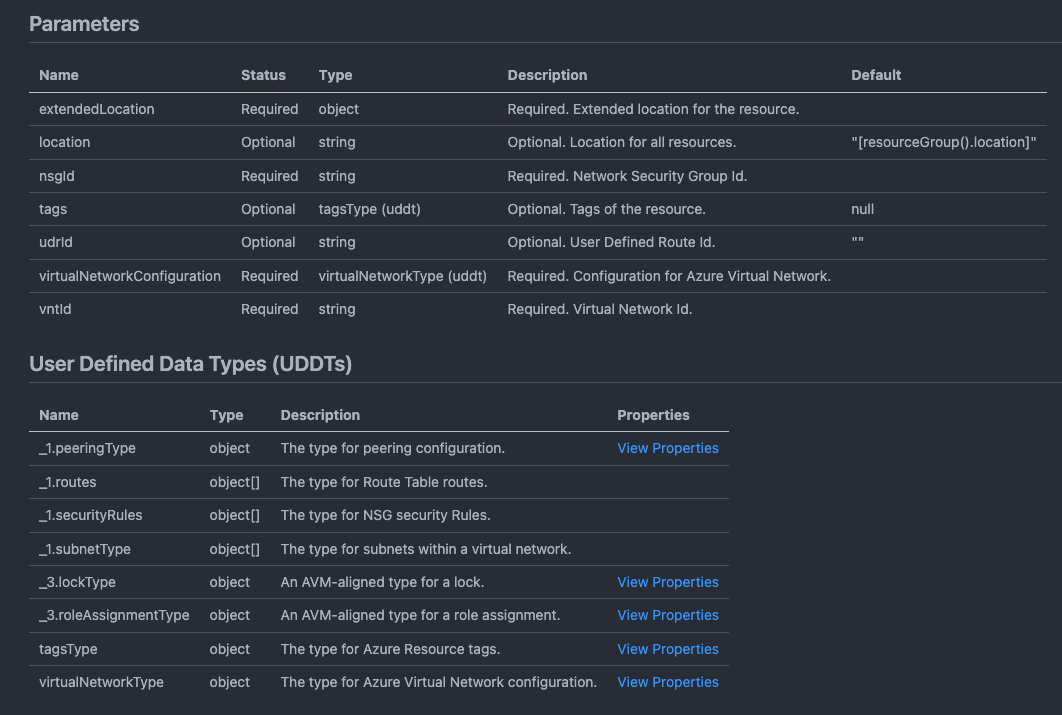
Parameters & User Defined Types
Outline the parameters required by the module and any custom User Defined Types (UDTs) that enforce standards across resource providers. The UDDTs with _1. and _3. prefixes are imported from the custom UDDT bicep (exported) so they can be imported here.
Variables
Variables defined in the Bicep file are documented next, providing insights into any computed values or configurations used within the template. Same as above the numbers indicate the shared variables being imported.

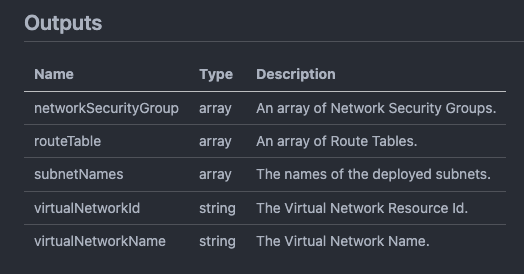
Outputs
Any defined outputs from the Bicep template are documented last, showing what information will be returned after deployment that can be useful for further processing or integration.
Conclusion
Bicep-docs takes the pain out of keeping your IaC documentation current. Instead of manually updating README files every time you change a template, you get consistent documentation generated directly from your code. It’s particularly useful when working with larger teams or complex module structures where keeping track of parameters, outputs, and dependencies becomes challenging. Worth adding to your workflow if you’re tired of documentation drift.
There is also PS-Docs that does a similar job but for more than just Bicep. This works hand in hand with documentation provided by Azure Verified Modules (AVM) and is worth checking out as well.
Tomorrow we’ll bring this and some of the other recent posts together and create some CI/CD pipelines that leverage Bicep modules, Bicep Docs, PSRule, linting and some other goodies to make your Bicep deployments more automated and reliable.