
Merry Bicep-mas: Sleighing IaC in 2025
 Stephen Tulp
December 5, 2025
9 minutes to read
2025 has been a solid year for Bicep. We’ve seen practical improvements and needed capabilities that address some existing pain points. From knowing who deployed what, to calculating subnet ranges without external tools, to finally being able to create Entra ID resources. As part of the resource for today’s Advent Calendar post, I also came across the Bicep Milestone Board that outlines the work in progress and activities that the team are working on for future releases.
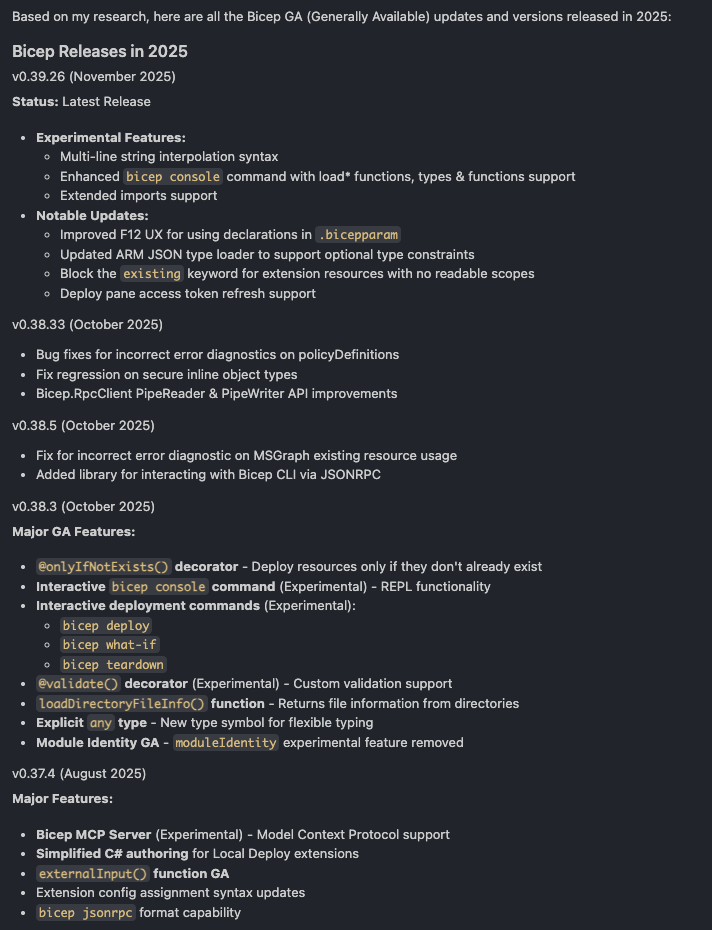
To give us a good summary and starting point, I used the Microsoft Learn MCP server from yesterday’s post to gather the release notes for all Bicep versions released in 2025.
Prompt: “Get me all the Bicep release updates and versions from January 2025 to December 2025”
The screenshot below is a snippet of the response I received from the MCP server, capturing the semantic version number, date and the respective release notes around GA and experimental features, breaking changes and updates.
The deployer() Function
The end of last year wrapped up with a highly requested feature in version v0.32.4: the deployer() function. Before this, identifying who or what was running a deployment within the template itself was a challenge, often requiring parameters to be passed in from the CI/CD pipeline.
The deployer() function returns an object containing the objectId, tenantId and userPrincipalName of the deploying identity. Official documentation can be found here.
output deployer object = deployer()
The output will look similar to this:
{
  "objectId": "aaaaaaaa-0000-1111-2222-bbbbbbbbbbbb",
  "tenantId": "aaaa0a0a-bb1b-cc2c-dd3d-eeeeee4e4e4e",
  "userPrincipalName": "stephen.tulp@insight.com"
}
This function provided us with two key use cases that would previously require other solutions:
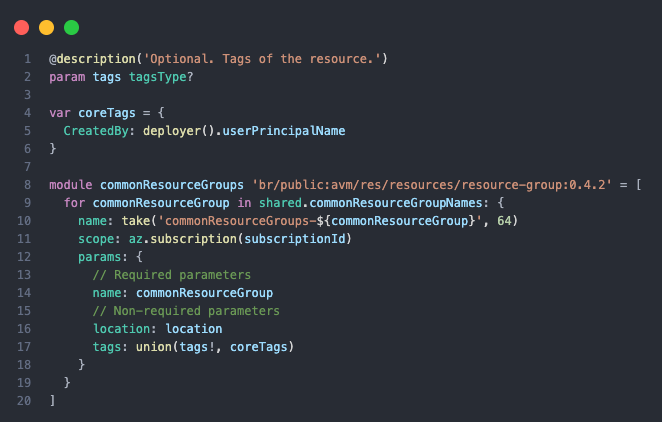
- Metadata Tagging: Tagging resources with the
CreatedByname anduserPrincipalNameas the value.
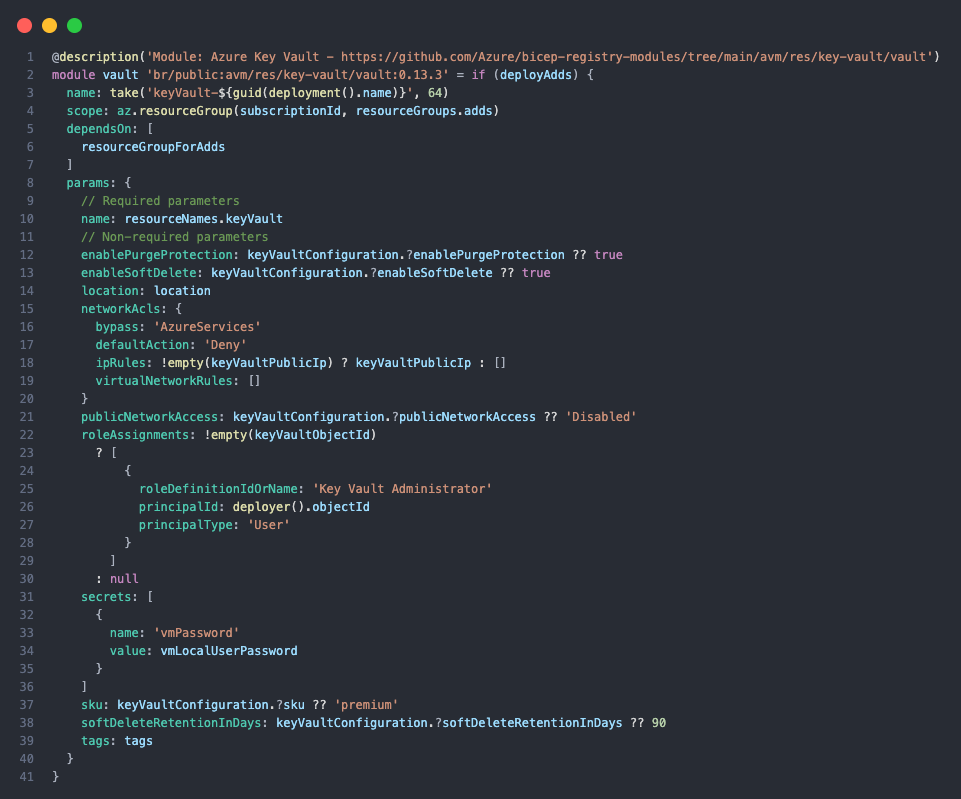
- Self-Assigned Permissions: Granting the deploying identity (e.g., a Managed Identity or User) specific RBAC roles on the newly created resources without needing complex script orchestration.
Secure Decorator for Module Outputs
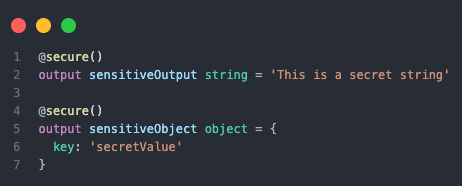
The @secure() decorator for module outputs allows you to mark sensitive values like connection strings or passwords so they’re hidden from deployment logs and outputs—finally bringing the same security guarantees to module outputs that parameters have had all along. This facilitates secure module communication to consuming Bicep files without compromising confidentiality.
Note: The
@secure()decorator only applies to string and object types. To secure other data types like arrays or numbers, they must be wrapped within a secureObject or serialised as a secureString. While this has increased security for module outputs, it’s still recommended to use Azure Key Vault or managed identities for authentication between Azure resources.
Availability Zone Functions
The toLogicalZone() and toPhysicalZone() functions enable automatic conversion between logical and physical availability zones. This is important for ensuring proper zone alignment when deploying cross-region disaster recovery configurations or multi-region active-active architectures.
While logical zones use standardised identifiers (like ‘1’, ‘2’, ‘3’) across Azure, the underlying physical infrastructure can vary between regions and subscriptions.

In this example, the output will be the actual physical zone identifier in the australiaeast region for the provided logical zone 1 for the specific subscription running the deployment.
Paste as Bicepparams
When pasting JSON values into a .bicepparam file, Bicep, particularly within tools like Visual Studio Code with the Bicep extension, will attempt to convert that JSON structure into its native Bicep object syntax.
This conversion is a feature designed to streamline the migration from ARM template JSON parameters to the more concise and readable Bicep parameter file format.
{
  "setting1": "stringValue",
  "setting2": 123,
  "setting3": {
    "nestedSetting": "nestedValue"
  }
}
When pasted from the .JSON format above, it will automatically convert to the Bicep equivalent below.
param myObject = {
  setting1: 'stringValue'
  setting2: 123
  setting3: {
    nestedSetting: 'nestedValue'
  }
}
Optional Module Names
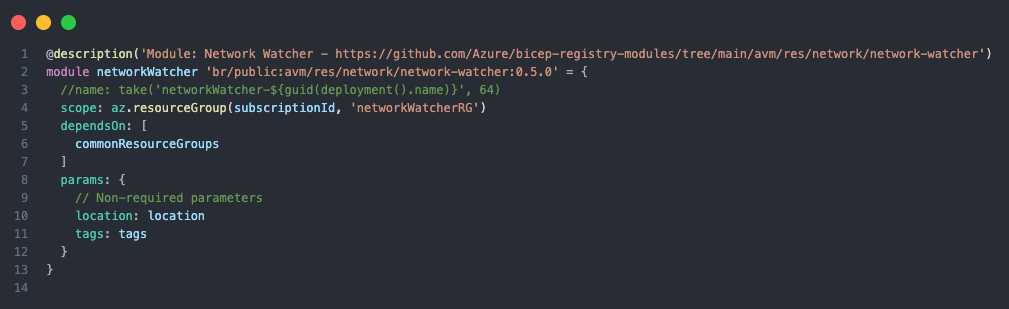
You can use an optional module name in Bicep to automatically generate a unique name for a nested deployment, which avoids naming conflicts during concurrent deployments. You can then omit the name property from your module, and Bicep will generate a unique name using the symbolic name and deployment name.
Resource Derived Types
Resource-derived types define parameters or variables based on an existing Azure resource schema. Instead of creating custom types, you reference the resource provider’s type directly, ensuring your code matches the expected structure.
Resource Derived Types provide:
- IntelliSense Support: Full autocomplete and validation in Visual Studio Code.
- Type Safety: Matches Azure resource schemas automatically, reducing misconfiguration.
- Zero Maintenance: The resource provider owns the type definition—no manual updates when schemas change.
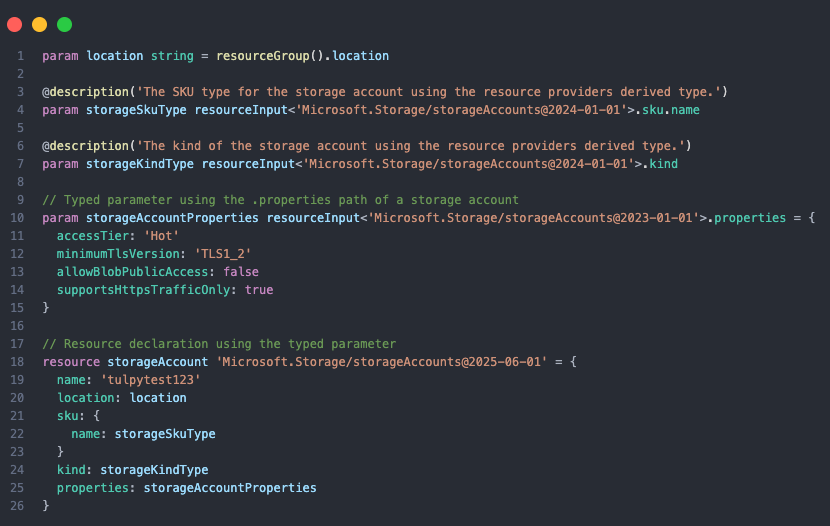
By using resourceInput<>, parameters are validated against the allowed values for the resource provider API version, this also negates the need to have allowed values within the code that could change.
The New Standard for GitHub Actions
The deprecated azure/arm-deploy action was succeeded by the dedicated azure/bicep-deploy action. This wasn’t just a rebrand; it introduced first-class support for Deployment Stacks, allowing for better lifecycle management of resources and removed the need for PowerShell or CLI scripting around deployments.
The action supports two main modes:
- Traditional: Validate -> What-If -> Create.
- Stacks: Validate -> Create (with Deny Settings) -> Delete.

The above is an example caller workflow using this new action, we will go into this in more detail next week.
Networking Made Easy with CIDR Functions
Networking in Azure often involves complex subnet calculations. In May, we explored the power of Bicep’s built-in CIDR functions, which removed the need for external calculators or hardcoded IP ranges.
parseCidr: Breaks down a CIDR block into network address, broadcast address, and netmask.cidrSubnet: Splits a CIDR block into smaller subnets.cidrHost: Calculates specific usable IP addresses within a range.
These functions have made dynamic network deployments significantly more reliable and readable. I wrote a post in May that went into this in more detail: The magic of the GatewaySubnet, BGP and Bicep CIDR functions.
Microsoft Graph Bicep Extension: Managing Entra ID as Code
One of the most significant additions in 2025 was the Microsoft Graph Bicep extension, which brought Entra ID resources into the infrastructure as code world. Previously, managing applications, service principals, and groups required separate PowerShell scripts or manual portal configuration. Now you can define these directly in your Bicep templates alongside your Azure resources.
The extension supports key Entra ID resource types:
- Applications and Service Principals: Define app registrations and their associated service principals with proper permissions.
- Groups: Create and manage security groups with members and owners.
- Relationship Management: Control group memberships and application ownership with append or replace semantics.
This unified approach means you can deploy an entire application stack, including Azure resources, Entra ID identities, and RBAC assignments—in a single template. The extension handles orchestration automatically, creating resources in the correct order and managing dependencies.
I recently wrote a post on creating Federated Credentials with OIDC using Bicep, I have just pushed an update to the repo, to include new functionality using the Microsoft Graph Bicep extension to create multiple Federated Credentials for an App Registration.
Community Contributions and Blogs
The Bicep community has been vibrant in 2025, with many contributors sharing their knowledge through blogs, tutorials, and open-source modules. Here is a small subset that you should add to your reading list:
- Awesome Azure Bicep A curated list of Bicep resources across official documentation, tools, libraries, and community contributions.
- Bicepify A repository of reusable Bicep modules and patterns for common scenarios by Dan Rios (MVP).
- Bicep Tips and Tricks Series by Andrew Wilson (MVP), covering various Bicep topics and best practices.
- LinkedIn Azure Bicep Group
Conclusion
Lots of new capabilities in Bicep have landed in 2025 that make it easier to manage infrastructure as code in Azure. Next time we will look at some of the experimental capabilities that are coming in 2026.