
Subscription Vending, Azure Landing Zones and Platform Engineering - Part 1
 Stephen Tulp
December 12, 2024
11 minutes to read
Over the last 8 years I have spent a lot of time designing, developing and deploying Azure Landing Zones, even before Microsoft landed on the Azure Landing Zone term. I remember the day I was made aware and got access to Project Northstar which eventually became the Enterprise Scale Landing Zones, which then evolved into Azure Landing Zones and what it is called today. I assume the move away from the word “Enterprise Scale” was to be more inclusive and standardising on the approach as it may have given mixed messages to smaller organisations that may have thought it wasn’t applicable to them.
Across the years I have seen organisations struggle to give their application teams the flexibility that they need to deliver workloads and services effectively. One key obstacle is the lack of a standardised approach to subscription vending, which can lead to confusion, delay, and inefficiency. I can’t remember the amount of times that I have started a project and then we have spent the next 2 weeks trying to figure out who has permissions to create new Azure Subscriptions.
In this post we will explore how platform teams can establish common subscription vending product lines that cater to the diverse needs of various application teams. Subscription vending doesn’t have a “one size fits all” design and this is why you need to have multiple options for the application teams.
What is Subscription Vending?
Subscription vending offers a platform mechanism to programmatically issue subscriptions to application teams for workload deployment. It extends the idea of subscription democratisation to application landing zones. In this approach, subscriptions, rather than resource groups, become the main unit of management and scale for workloads.
The diagram below outlines where subscription vending fits into the Azure Landing Zone lifecycle.

Why is it Important?
Subscription vending standardises and automates the process of requesting, deploying, and governing subscriptions for application landing zones. This approach simplifies subscription creation and places it under organisational governance, allowing application teams to focus on deploying their workloads with greater confidence and efficiency.
- Streamlined process: Subscription vending serves as an official entry point for application teams to request subscriptions, removing the need for them to navigate the subscription process independently.
- Improved velocity: Application teams can access application landing zones more quickly and onboard workloads faster.
- Efficient governance: The Platform Engineering team can enforce governance on application landing zones with minimal overhead.
Subscription Vending Architecture
The subscription vending automation needs to address three (3) primary tasks;
- Collect subscription request data.
- Initiate platform automation.
- Create the subscription by using infrastructure-as-code.
There are several approaches for implementing subscription vending automation to achieve these tasks. The diagram below outlines one approach that uses a Gitflow. The Gitflow design aligns with the declarative approach that many Platform Engineering teams use to manage the platform.
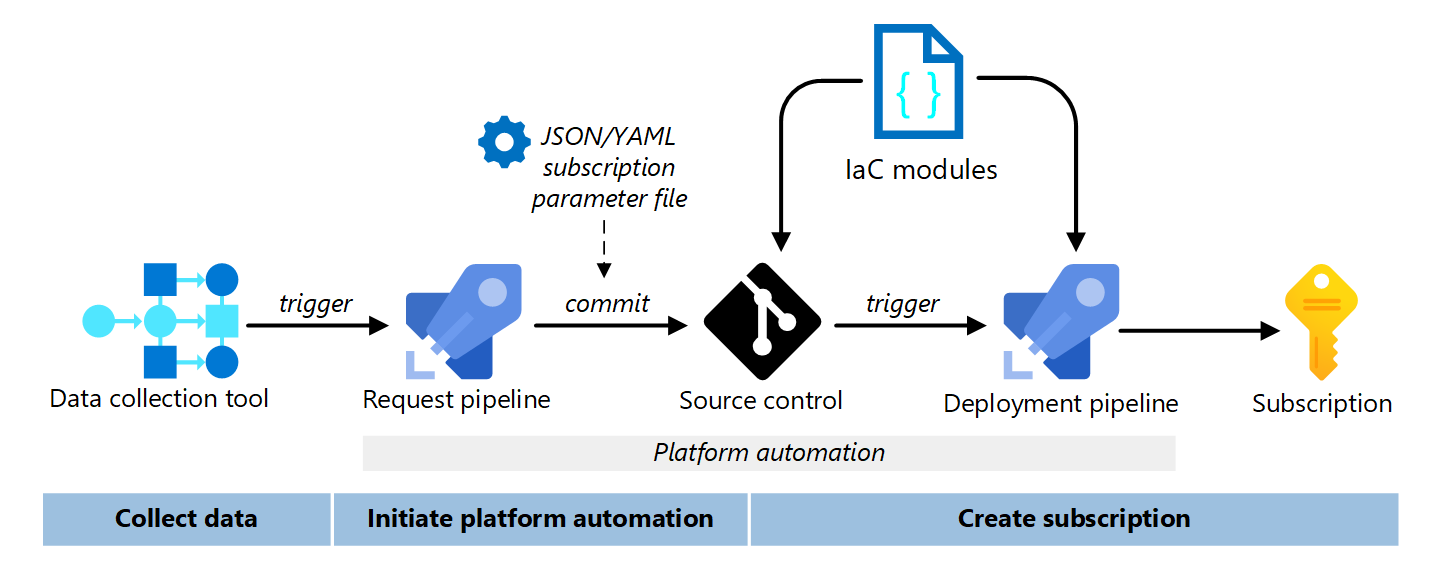
A summary of the flow includes,
- The data collection tool gathers subscription request data.
- When the subscription request receives approval, it initiates the platform automation.
- The platform automation consists of the request pipeline, source control, and deployment pipeline.
- The request pipeline creates a JSON or YAML subscription parameter file with the data from the data collection tool.
- The request pipeline also creates a new branch, commits the subscription parameter file, and opens a pull request in source control.
- The new branch merges with the main branch in source control. The merge triggers the deployment pipeline to create the subscription with the IaC modules.
The deployment should place the subscription in the correct management group based on the governance requirements. The deployment creates a preliminary subscription budget as the foundation for cost management. Based on the needs of the workload, the deployment could create an empty virtual network and configure peering to a regional hub. The platform team should hand off the subscription to the application team after creation and configuration. The application team should update the subscription budget and create the workload resources.
Collect Data
The primary goal of collecting data is to obtain business approval and define the values for the JSON/YAML subscription parameter file. When the application team submits a subscription request, you should use a data collection tool to gather the necessary data. This tool should interface with other systems in the subscription vending workflow to initiate platform automation.
- Use a Data Collection Tool: You can utilise an IT Service Management (ITSM) tool like Service-Now or build a customer portal with low-code or no-code like Microsoft PowerApps to collect the data.
- Gathering Required Data: Collect sufficient data to define the values of the JSON/YAML subscription parameters for automated deployment. The specific values depend on requirements, but you should capture the request authoriser, cost center, and networking requirements (internet or on-premises connectivity). Additionally, ask the application team for anticipated workload components (application platform, data requirements), data sensitivity, and the number of environments (development, test, uat, production).
- Validating Data Validate the data during the collection process to avoid issues later in the platform automation phases.
- Create a Trackable Request: The data collection tool should generate a logged and trackable request for a new subscription (e.g., a ticket in an ITSM tool). This request should contain all necessary data to fulfill the subscription requirements.
- Interfacing with Internal Systems: The data collection tool should interface with other tools or systems in the organisation to enrich the request with additional data. You might need identity, finance, security, and networking data to execute the automation. For example, the automation could interface with an IP address management (IPAM) tool to reserve the appropriate IP address space.
- Creating a Trigger: Once the subscription request is approved, the data transfer should trigger platform automation. It’s best to create a push notification with the necessary data from the data collection tool. You might need a middleware layer, such as Azure Functions or Azure Logic Apps, to initiate the process.
Platform Automation
The notification and data from the data collection tool should initiate platform automation. The objective of this automation is to create a JSON/YAML subscription parameter file, merge it into the main branch, and deploy it using IaC modules to establish the subscription. The Platform Engineering team owns and maintains this automation.
Other recommendations for platform automation include:
- Use one file per subscription request: The subscription is the unit of deployment in the subscription vending process, so each subscription request should have one dedicated subscription parameter file.
- Use a pull request system: The Gitflow process that creates the subscription parameter file should automate the following steps:
- Create a new branch for each subscription request.
- Use the data collected to create a single YAML/JSON subscription parameter file for the new subscription in the branch.
- Create a pull request from the branch into main.
- Update the data collection tool with a state change and reference to this pull request.
- Validate the subscription parameter file: The pull request should trigger a linting process to validate the request data. The goal is to ensure the deployment is successful. It should validate the YAML/JSON subscription parameter file. It could also verify that the IP address range is still available. You might also want to add a manual review gate with human intervention. They could perform the final review and make changes to the subscription parameter file. The output should be a JSON/YAML subscription parameter file with all the data to create a subscription.
- Trigger the deployment pipeline: When the pull request merges into the main branch, the merge should trigger the deployment pipeline.
Create Subscription
The final step in the subscription vending automation process is to create and configure the new subscription with infrastructure-as-code modules and a JSON/YAML subscription parameter file.
- Use Infrastructure as Code (IaC): A no brainer but deployments should utilise IaC to create the subscription. The Platform Engineering team creates and maintains these templates to ensure proper governance.
- Utilising a Deployment Pipeline: The deployment pipeline orchestrates the creation and configuration of the new subscription. The pipeline should execute the following tasks:
| Task category | Pipeline task |
|---|---|
| Identity | • Create or update Microsoft Entra resources to represent subscription ownership. • Configure privileged workload identities for workload team deployments. |
| Governance | • Place in management group hierarchy. • Assign subscription owner. • Configure subscription-level role-based access controls (RBACs) to configured security groups. • Assign subscription-level Azure Policy. • Configure the Microsoft Defender for Cloud enrollment. |
| Networking | • Deploy virtual networks. • Configure virtual network peering to platform resources (regional hub). |
| Budgets | • Create budgets for the subscription owners by using the collected data. |
| Reporting | • Update external systems, such as IPAM, to commit to IP reservations. • Update the data collection tool request with final subscription name and globally unique identifier (GUID). • Notify the application team that the subscription is ready. |
To create a subscription programmatically, a commercial agreement is necessary. If you don’t have one, you will need to introduce a manual process for creating the subscription, but you can still automate all other aspects of the Azure Landing Zone.
- Establishing a Workload Identity: The deployment pipeline requires permission to perform operations with all the systems it interfaces with. You should use either managed identity or OpenID Connect (OIDC) to authenticate to Azure.
Post Deployment
The subscription vending automation ends with subscription creation and configuration. The Platform Engineering team should hand off the new subscription to the application team after creation. The application team should update the subscription budget, create the workload resources, and deploy the workload. The Platform Engineering team controls the governance of the subscription and manages changes to subscription governance over time.
Conclusion
Azure Subscription Vending is a crucial process for efficiently managing and automating the creation and configuration of Azure Subscriptions and Landing Zones. By leveraging tools like Service-Now, PowerApps, and IaC modules, organisations can streamline their cloud operations. The integration of data collection tools, deployment pipelines, and platform automation ensures that subscriptions get created with proper governance and compliance.
While you wait for Part 2, where will dive into the code and look at a couple of different implementation of Subscription Vending and Azure Landing Zones, I recommend to take a look at some extra reading below.